Dr. Sarah’s favorite resources of the week(s) (Feb. 23 to March 4, 2012)

March 5, 2012

I am behind with posting some of my favorite resources. Here are my favorite resources of the past couple of weeks, curated from my Twitter account.

Ed tech resources

Technology tools for Education Majors – Prezi

18 Free Screencasting tools to Create Video Tutorials – Web Design Blog

Seriously good resources for Screencasting – Timo Ilomäki ‘s Library

How to Build Rapport With Online Teachers – by Jennifer Williamson

Fluidsurveys – Online survey tool

7 Resources for Teaching and Learning Anatomy & Physiology – from FreeTech4Teachers

7 Strategies to Make Your Online Teaching Better – Inside Higher Ed

Literacy and languages resources

Teacher resources – Noodle Tools

The Best Apps for Learning a Foreign Language – Mobiles Please Blog

The 100 ‘Greatest Books for Kids’ – USA Today

Spark Enthusiasm – Movie and video resources for teaching Spanish

Livres audio gratuits à écouter et télécharger – Free audio books for teaching French – http://www.litteratureaudio.com/

English as a second / additional language (EAL) and related resources

Canadian Newcomer Magazine – Lots of resources and info for New Canadians

Understanding Different English Accents – Daily English Activities Blog

General education resources

40 Alternative Assessments for Learning – by Charity Preston

Differentiated Instruction – Teachers Offer Help and Resources – Teachers.net

30 Online Multimedia Resources for PBL and Flipped Classrooms – 21 Century Ed Tech

Social media resources

TweetChat – An easy way to follow Twitter chats

Related posts:

Dr. Sarah’s favorite news of the week (Feb. 6-12 2012)

Dr. Sarah’s favorite resources of the week (Jan. 30 – Feb. 5, 2012)

Dr. Sarah’s favorite resources of the week (Jan. 23-29, 2012)

Dr. Sarah’s favorite resources of the week (Jan. 16-22, 2012)

Dr. Sarah’s favorite resources of the week (Jan. 9-15, 2012)

Dr. Sarah’s favorite resources of the week (Jan. 2-8, 2012)

Dr. Sarah’s favorite resources of the week (Dec. 25, 2011 to January 1, 2012)

Dr. Sarah’s favorite resources of the week (Dec. 18-24, 2011)

Dr. Sarah’s favorite resources of the week (Dec. 11-17, 2011)

Dr. Sarah’s favorite resources of the week (Dec. 4-10, 2011)

____________________________

Share this post: Dr. Sarah’s favorite resources of the week (Feb. 27 to March 4, 2012) http://wp.me/pNAh3-1hD

Update – January 2018 – This blog has had over 1.8 million views thanks to readers like you. If you enjoyed this post, please “like” it or share it on social media. Thanks!

Sarah Elaine Eaton is a faculty member in the Werklund School of Education, University of Calgary, Canada.


9 Tips for Successfully Incorporating Virtual Presentations into Your Conference

February 16, 2012

Today I had the coolest experience. My colleagues at Idaho State University (ISU) Workforce Training were having an educational technology conference today in Pocatello. I teach for them online, but today’s conference was live — except for one presenter, me.

Here’s how we did it:

1. Brief your presenter on what to expect

Jeff Hough and the team at ISU gave me a thorough briefing about the conference a few weeks prior to the event. We negotiated the terms of the presentation and they gave me details on what to expect.

2. Tech-savvy conference organizers

These folks specialize in offering professional development webinars for educators. I’ve done dozens of webinars and used the same platform (in this case, Adobe Connect) that the conference organizers had on hand. They knew how to set up their system and had used their webinar platform hundreds of times before. They are adept at all kinds of technology and had significant experience successfully producing webinar presentations.

Sarah Elaine Eaton, virtual, presenter, webinar, education, professional development3. Experienced and energetic virtual presenter

Modesty aside, it is safe to say that I know how to give a virtual presentation. I have colleagues who flatline in a webinar environment because they “need the crowd to give them their energy”. At today’s conference, I never saw my audience. Well, not until after when one of my ISU colleagues, Paul Dickey, tweeted this photo (which I saw after the presentation).

Some of the worst virtual workshops or keynotes I have seen have been given by people who have no experience or webinar training. (In case you’re interested, here’s how you can get trained).

4. Previously presented material

Ensure the presentation has been tested. The conference organizers asked me to repeat a Twitter for Teachers workshop that I had taught for them previously. They had already seen the program delivered via webinar and liked it. The program had already proven to be a success.

Conference organizers want their attendees to have a stellar experience. Many things can go wrong with a virtual presentation. Make sure the presenter’s content is not one of them.

5. Do a connectivity test

Before the conference, we tested all the technology we were going to use – audio, video, slides and a real-time screen share. Hotels and conference centres are notorious for having poor wireless connections. The more people who tap into them, the slower they get. Virtual presentations chew up a lot of bandwidth. Even if your system works perfectly at the office, having a new venue changes the game. Every single piece of tech needs to get tested… and tested again.

As we prepared for today, we had some issues with the audio. We made some adjustments that helped significantly when the room was filled with a live audience.

6. Expect the unexpected

At one point during today’s session, we lost audio. Because we were all experienced working in a virtual environment and were aware of our audio problems during the connectivity test, it came as no surprise when the audio cut out. We were quickly able to work things through and I picked up where I had been cut off. Both the conference organizers and the presenter need to be able to keep their cool when “tech happens” in front of a room full of people.

Every person involved in today’s virtual program understood what aspects of the production we could control, such as our individual mics and computer settings and which we could not control, such as the venue’s wireless connection cutting out. Knowing what you can and can not control puts you in a better position to problem solve on the fly.

7. Include real-time interactivity

In my case, Jeff acted as a host for the session, introducing me and then fielding questions from the audience. At the beginning of the session, I said, “OK, let’s do a show of hands in the room. How many people use Twitter right now?”

Jeff acted as my eyes and ears and reported back to me, “There are crickets in the room, Sarah,” meaning that there was silence. He then added, “There are maybe four hands up.”

“O.K.,” I said. “That is less than 10% of the room. Let’s see if we can’t increase that by the end of the presentation…”

We stayed in constant contact throughout the session, talking back and forth, naturally and with a conversational tone.

8. Show, don’t tell

There is a certain amount of “telling” in an instructional program, but try to limit it as much as possible.

My presentation included a combination of static slides and a real-time screen share. I was showing folks how to use Twitter, so I demonstrated it live. Because Jeff also has a Twitter account, we were able to Tweet back and forth in real time and the participants could see it on screen.

The highlight for me as a presenter came when one participant signed for Twitter during the presentation and Tweeted “@DrSarahEaton“, as I had shown them how to do moments earlier.

I noticed it on my feed and said, “Hey, who’s that? Is that someone who’s in the conference room right now?”

Jeff asked the brand-new-baby-Tweeter to raise his or her hand. She did.

This was the single best moment for me as a virtual presenter. It was completely unrehearsed and unexpected. We had no idea anyone was going to sign up for Twitter right then and there and start putting the content into action at that very moment.

It caught the attention of every single person in the room and suddenly, it all made sense. What I had been saying about educators being able to connect in real time from all over the world, was no longer something I said, it was something we were able to actually show them. It was the coolest thing.

After that, a few other people joined in and sent Tweets, too.

Jimeny Cricket may have talked, but these crickets Tweeted! It was brilliant.

9. Give participants a valuable handout

Participants did not get a copy of my presentation slides. (Bor-ing!) Instead, every participant received a copy of the Twitter for Teachers manual that I did to accompany the course. It is a 25-page, step-by-step how to guide that steps them through the exact processes I showed during the presentation, in exactly the same order. Well, except for the spontaneous moments that made the session come alive.

The technical aspects of a virtual presentation increase your risk of failure significantly. Just about anything can go wrong. Even with all the preparation in the world, the potential for unexpected screw ups can still happen. Lots of preparation helps to mitigate that risk. Having an experienced team who have worked together before also helps tremendously.

You know when a virtual presentation has been truly successful because the webinar technology becomes “invisible”. When participants are so into the experience that they almost forget their presenter is hundreds, if not thousands of miles away and their sense of distance has melted away, you know you’ve just incorporated a great virtual presentation into your conference.

A personal thanks from me to all the folks at ISU Workforce Training. As any experienced virtual presenter knows, those work on the production team are the real stars of the show.

_____________

Share or Tweet this post: 9 Tips for Successfully Incorporating Virtual Presentations into Your Conference http://wp.me/pNAh3-1fm

Update – January 2018 – This blog has had over 1.8 million views thanks to readers like you. If you enjoyed this post, please “like” it or share it on social media. Thanks!

Sarah Elaine Eaton is a faculty member in the Werklund School of Education, University of Calgary, Canada.


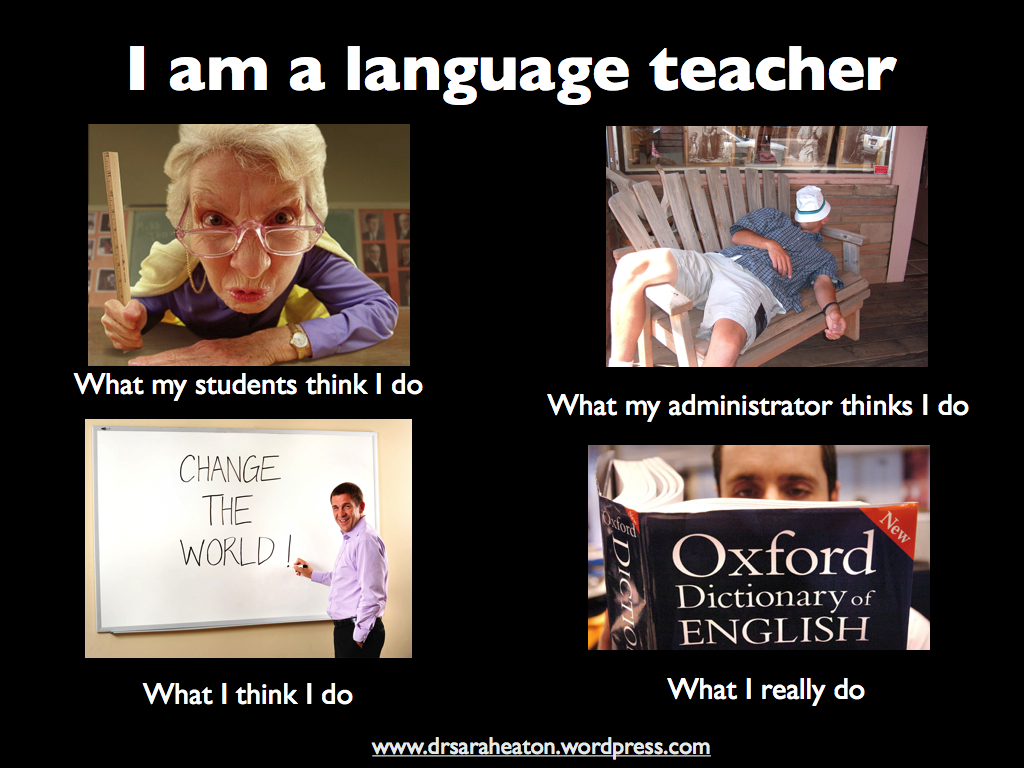
“I am a language teacher”: A picture says a thousand words

February 16, 2012

I’ve seen a few of these photo collections flying around the Internet recently. This is one I did up… just for fun.

Sarah Elaine Eaton I am a language teacher speaker presenter humor funny

You have my permission to share it… Just leave the blog link at the bottom, please. 😉

____________________________

Share this post: “I am a language teacher”: A picture says a thousand words  http://wp.me/pNAh3-1fb

Update – January 2018 – This blog has had over 1.8 million views thanks to readers like you. If you enjoyed this post, please “like” it or share it on social media. Thanks!

Sarah Elaine Eaton is a faculty member in the Werklund School of Education, University of Calgary, Canada.


Dr. Sarah’s favorite resources of the week (Feb. 6-12, 2012)

February 13, 2012

This past week, I was inundated with so many great articles and resources that to help you avoid getting overwhelmed, I’m dividing up my favorites of the past week into two posts: news and resources.

Here are my favorite resources of the week, curated from my Twitter account.

Ed tech resources

6 Sites to get kids excited about Google Maps – Fractus Learning

An app to create lesson plans – Tech & Learning

Web 2.0 Tools: Tools and Teacher Resources – 2Learn.ca

The Best Education Apps at FETC – by Stephen Noonoo, the Journal

Project-Based Learning for Digital Citizens – by Andrew Marcinek

Top 10 Free Online Tutoring Tools for 2012 – Edudemic

Literacy and languages resources

5 Keys to Snagging Reluctant Readers – Shelf Consumed

Open Source Language Education Resources – Yazik

ESL Literacy – Learning from Research: A Review of the Literature – Bow Valley College

General education resources

20 Must-Have Educational Resources For All Teachers – Edudemic

Social media resources

10 Tips for Creating a Social Media Policy for Your Business – by Jennifer Amanda Jones, Social Media Examiner

General resources that I thought were cool and useful

Starting and Managing a Small Business – Business Victoria (Note: Lots of great resources here for non-profits, too).

Step Outside Your Comfort Zone and Study Yourself Failing – by Joshua Foer

Pretty Good – poem by Charles Osgood

Related posts:

Dr. Sarah’s favorite news of the week (Feb. 6-12 2012)

Dr. Sarah’s favorite resources of the week (Jan. 30 – Feb. 5, 2012)

Dr. Sarah’s favorite resources of the week (Jan. 23-29, 2012)

Dr. Sarah’s favorite resources of the week (Jan. 16-22, 2012)

Dr. Sarah’s favorite resources of the week (Jan. 9-15, 2012)

Dr. Sarah’s favorite resources of the week (Jan. 2-8, 2012)

Dr. Sarah’s favorite resources of the week (Dec. 25, 2011 to January 1, 2012)

Dr. Sarah’s favorite resources of the week (Dec. 18-24, 2011)

Dr. Sarah’s favorite resources of the week (Dec. 11-17, 2011)

Dr. Sarah’s favorite resources of the week (Dec. 4-10, 2011)

____________________________

Update – January 2018 – This blog has had over 1.8 million views thanks to readers like you. If you enjoyed this post, please “like” it or share it on social media. Thanks!

Sarah Elaine Eaton is a faculty member in the Werklund School of Education, University of Calgary, Canada.


Dr. Sarah’s favorite news of the week (Feb. 6-12, 2012)

February 13, 2012

Sarah Eaton speaker education literacy keynote social media This past week, there were so many great articles and resources that came past my desk that I was almost overwhelmed. To help you avoid getting overwhelmed, I’m dividing up my favorites of the past week into two posts: news and resources.

Here are my favorite news stories of the week, curated from my Twitter account.

Social media news

German police use Facebook pictures to nab crooks – by Alice Baghdjian, Reuters

Employers, workers navigate pitfalls of social media – My Joy Online

Study: Why Do People Use Facebook? – ReadWriteWeb

Texting, social media prove problematic for teachers across the country – Laura Graff

What Schools are Really Blocking When They Block Social Media – by S. Craig Watkins

Literacy news

Caution: Not Embracing ‘Continuous Learning’ has become an Occupational Hazard – QELA

Newfoundland group wants literacy plan from the province – The Telegram

Wilsonville launches early childhood literacy program, putting free books in the hands of preschoolers– by Rachel Stark, The Oregonian

Language learning news

Hearing Bilingual: How Babies Sort Out Language – by Perri Klass, New York Times

Bilingual children gain better focus, literacy skills: York U study – Exchange magazine

Schools join forces to rescue languages – by Amanda Dunn, The Age

Finer points lost in Google translation – by Mark Abley, Montreal Gazette

Education news

The Future of Work for High School Grads – by Jordan Weissmann, The Atlantic

Why Pay for Intro Textbooks? Rice University Announces Open Source Textbooks – by Mitch Smith, Inside Higher Ed

Teacher retention a growing Alberta problem – by Jeremy Nolais, Metro

Technology news

How Computer Games Help Children Learn – MindShift

Study: U.S. gaming population has nearly tripled in three years – by Stephanie Fogel, GamesBeat

General interest

Speaking Up Is Hard to Do: Researchers Explain Why – by Elizabeth Bernstein, Wall Street Journal

Labour shortage becoming ‘desperate’ – by Barrie McKenna, Globe and Mail

Want People to Return Your Emails? Avoid These Words  – Mashable

The Business Savvy Behind Nonprofit Success – by David LePage, Canadian Centre for Nonprofit Renewal

Related posts:

Dr. Sarah’s favorite resources of the week (Jan. 30 – Feb. 5, 2012)

Dr. Sarah’s favorite resources of the week (Jan. 23-29, 2012)

Dr. Sarah’s favorite resources of the week (Jan. 16-22, 2012)

Dr. Sarah’s favorite resources of the week (Jan. 9-15, 2012)

Dr. Sarah’s favorite resources of the week (Jan. 2-8, 2012)

Dr. Sarah’s favorite resources of the week (Dec. 25, 2011 to January 1, 2012)

Dr. Sarah’s favorite resources of the week (Dec. 18-24, 2011)

Dr. Sarah’s favorite resources of the week (Dec. 11-17, 2011)

Dr. Sarah’s favorite resources of the week (Dec. 4-10, 2011)

____________________________

Share this post: Dr. Sarah’s favorite news of the week (Feb. 6-12, 2012) http://wp.me/pNAh3-1ev

Update – January 2018 – This blog has had over 1.8 million views thanks to readers like you. If you enjoyed this post, please “like” it or share it on social media. Thanks!

Sarah Elaine Eaton is a faculty member in the Werklund School of Education, University of Calgary, Canada.