How to delete LinkedIn contacts who spam you (and why you should)

July 14, 2013

Have you noticed an increasing amount of spam messages coming to your LinkedIn inbox? I have.

A few years ago, I adopted a LinkedIn Open Networking (LION) policy. I would accept connections from anyone who requested one. I have recently changed my mind on that for one single reason: Inbox spam.

The topic of LinkedIn spam has been growing online. This commentary by Andy Lopata in the Huffington Posts questions whether LinkedIn will sink in a sea of spam.

Lopata reminds us that LinkedIn can be a valuable professional networking tool, but that potential is often not realized. Sinking into spam tactics is bringing down the value of the social networking platform for all users.

Characteristics of LinkedIn spam

I have heard that technically, “Inmail” isn’t spam, but rather a message from a Linked in contact. I disagree with that. Spam is unsolicited virtual junk mail, no matter how it arrives. Spam messages are rarely personally addressed and even if they are, the content is generic. The content is not personalized or individualized. The hallmark of spam is that it is really never about you. It’s about them, their product, their website, their business, their search engine rankings, their whatever.

These direct messages seem to fit into one of these categories:

“Like” spam

I first heard this term from Daylan Pierce who wrote about it on his blog. This type of spam essentially asks you to “like” this or that. The reason people do this is that the more “likes” post gets, the higher it boosts their ranking in social media. If people really do enjoy a post or a resource, they’ll take it upon themselves to share it anyway.

Invitations

These are either sales pitches or calls for action that are couched as “invitations”. They are not actual invitations, but rather a mass message asking to you buy a product, visit a website, sign up for a program, etc.

Requests for reviews or feedback

As an academic, I have written reviews of professional products that have been published in peer-reviewed scholarly journals. This is very different from LinkedIn spammers who send mass messages with requests for feedback on their latest product or project. If I’m going to spend my time reviewing a new product and then share that feedback in a public way, it is likely going to be a resource that really piques my interest. Spam messages do not pique my interest. LinkedIn spam messages asking me to visit a website (i.e. drive traffic to the website, for the purpose of driving its search engine rankings) and leave a comment (i.e. increase activity on the website, for the purpose of driving up its search engine rankings) get deleted, not reviewed.

Sponsorship requests

As if calls on a weekly basis from telemarketers asking me to donate to a cause weren’t enough, now requests come via LinkedIn spam. Here’s a hint: I won’t support spamming… or causes that ask for donations using this method. There are plenty of good causes out there that get my donation dollars. The recent flooding in my home town of Calgary is a good example.

 “Check out my latest __________” requests

Requests to check out the contact’s latest blog post, YouTube video, webinar or whatever is just an attempt to drive traffic to their sites.

I now have a new policy: If you spam me via my Inbox on LinkedIn, I delete you as a contact. No reply. No questions asked.

How to remove LinkedIn contacts

It is not an intuitive process to remove a LinkedIn contact. You have to go through several steps to do it. Here’s how:

Note down the name of the person you want to delete as a contact.

Click on Network. This will produce a drop-down menu.

LinkedIn contacts

Click on Contacts.

This will produce a list of your contacts.

On the left-hand side menu there is a box to Filter Contacts.
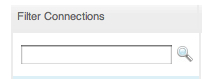
Filter contacts

In that box, enter the name of the person you want to delete. Hit enter.

That should produce a search result of the unwanted contact.

Check the box next to his or her name.

Then, in the upper-right hand side of your screen, click on “Remove connections”. That choice is on the far right of your screen:

Remove connections

This is a bit of a laborious process, but it is worth it. I have found that once someone starts spamming you with Inbox message, they do not stop.

Why I am no longer a LinkedIn Open Networker (LION)

I admit it. For me, being a LinkedIn Open Networker has failed. Instead of widening my network in an open and inclusive manner, open networking has filled my Inbox with unwanted messages that are a waste of time and energy.

I rarely send LinkedIn mail any more. When I do send Linked InMail, it is personalized, specific, to the point, and of legitimate value to the person or people I am writing to.

On occasion, I have received a message from someone I know personally who is working hard to build a new business or brand. If they send me a message asking me to visit their website or like something, I will do that for them… but the reason I do is because I know them personally. We already have a relationship and they are asking for a favor. I know, intuitively, that if I were to ask for a similar favor that they would do the same for me. The difference is the depth of our relationship and a sense of loyalty to one another. Spammers often do not even know who you are… They just spam everyone in their address book. There’s no depth to the relationship, no trust and no foundation of history or loyalty that justifies asking for a favour.

LinkedIn can be a powerful professional networking tool. Building trusting professional relationships takes time and effort… and it starts with caring about the other person as both a professional and a human being. Let your sense of personal leadership and a desire to cultivate meaningful professional relationships drive your LinkedIn (and all social media) activity.

Related post: De-grouping on LinkedIn to be a more effective leader http://wp.me/pNAh3-1De

_____________________

Share or Tweet this: How to delete LinkedIn contacts who spam you (and why you should) http://wp.me/pNAh3-1CO

Update – January 2018 – This blog has had over 1.8 million views thanks to readers like you. If you enjoyed this post, please “like” it or share it on social media. Thanks!

Sarah Elaine Eaton is a faculty member in the Werklund School of Education, University of Calgary, Canada.


Blogging workshop for ESL Teachers

January 7, 2013

iStock-woman at laptopI am super excited about an upcoming workshop I am doing. I get to combine two of my favorite passions: working with language teachers and blogging. Here’s our tentative agenda:

Introduction

  • What is a blog?
  • Why do we blog?

Getting Ready to Blog

  • Tips for creating excellent blog posts
  • Using multimedia in your blog
  • Blogging for and with students

Write on! Hands-on blogging

  • Setting up your blog
  • Writing your first blog post
  • Adding categories, tags and excerpts
  • Creating visual interest with photos

What do you think? Have I missed anything? What words of wisdom would you have for teachers who are learning how to blog for the first time? I’d love to hear your comments and thoughts.

_________________

If you enjoyed this post, please “like” it or leave a comment. Thanks!

Share or Tweet this: Blogging workshop for ESL Teachers http://wp.me/pNAh3-1yl

Update – January 2018 – This blog has had over 1.8 million views thanks to readers like you. If you enjoyed this post, please “like” it or share it on social media. Thanks!

Sarah Elaine Eaton is a faculty member in the Werklund School of Education, University of Calgary, Canada.


Global Trends in 21st Century Education: Thinking about Technology, Teaching and Learning in the New Millennium – Speaking in Quesnel, BC

October 23, 2012

Last Friday, I was in Quesnel, British Columbia to present at the professional development day for K-12 teachers in School District 28. I was honored to be their keynote speaker, as well as do two workshops afterwards. Here is what I presented:

Keynote address – Global Trends in 21st Century Education: Thinking about Technology, Teaching and Learning in the New Millennium

This talk is based on research I have been doing since 2010 on emerging trends in education across most developed nations and what we might expect over the next 15 to 20 years. I am not a futurist by training, but there are elements of looking down the road and being able to say, “This is where we are today, and it is not impossible that this is where we are heading.”

Workshop #1 – Appreciating Innovation and Incorporating Wisdom Across the Educational Spectrum

This workshop had an educational leadership focus. We looked at how teachers with different approaches to technology can learn to work together for the benefit of students. It was a strength-based approach to working together in the digital age.

Workshop #2 – Learning the Twenty-First Century Way: Making Sense of How to Use Social Media for Classroom Learning and Student Engagement

In this workshop, I shared how I incorporated Twitter into one of my university level classes. Then we had some hands-on time in the lab and teachers got set up with their first Twitter account.

I really enjoyed my time in Quesnel, a small city of 10,000 people where the pulp mill is a major employer and residents are concerned about the land slippage into the Fraser River that is affecting homes and roadways.

I always find that I learn a lot from taxi drivers when I go somewhere to speak and Quesnel was no exception. The cab driver who picked me up at 7:15 a.m. to take me over to the high school told me that his fares so far that morning had included a round-trip drug run and that poverty was a major issue in the community.

Stories like that were countered by the one told to me by Mike Adams, the principal at Correlieu Secondary School, where our PD day was held. He told me that the young man who got the sound system set up for the day had essentially been abandoned by his parents as a teenager. Instead of turning to drugs, he was surrounded by friends, teachers and administrators who wanted to help. As a result, he was on the football team, in the band and part of the school musical. He turned his life around thanks to the strong sense of community and support he found.

Thank you gift from Quesnel, BC - keynote speaker, Sarah Elaine EatonThanks to Lisa Kishkan, who organized the whole PD day for the teachers, including the other workshops that included sessions on intrinsic vs extrinsic motivation; the art of Pysanky (Ukrainian Easter Eggs); and the aboriginal medicine wheel. I really enjoyed my time in Quesnel and as always, I think I learned as much as I shared.

I am excited to try the “birch syrup” that the teachers gave to me as a thank you gift at the end of the day. And I love coffee and I’ll enjoy the new coffee mug that will always remind me of the trip. Thank you to the educators of Quesnel for the great work you do.

______________

Share or Tweet this: Global Trends in 21st Century Education: Thinking about Technology, Teaching and Learning in the New Millennium – Speaking in Quesnel, BC http://wp.me/pNAh3-1vj

Update – January 2018 – This blog has had over 1.8 million views thanks to readers like you. If you enjoyed this post, please “like” it or share it on social media. Thanks!

Sarah Elaine Eaton is a faculty member in the Werklund School of Education, University of Calgary, Canada.


10 Ideas for Non-Profit Facebook Posts

May 7, 2012

I’ve been working with a non-profit literacy group in Calgary who really wants to increase their Facebook and Twitter presence. The group asked me today, “What kinds of things can we post on our Facebook page?” Well, folks, this one’s for you.

  1. A group photo of your staff.
  2. A photo of the building where you are located.
  3. A photo of the materials you use in your program.
  4. A link to an online article about your areas of expertise (Example: early childhood literacy).
  5. A link to an upcoming event or program.
  6. A link to an interesting and relevant online newspaper article.
  7. Links to resources in your field.
  8. Call for papers for an upcoming conference in your field.
  9. Links to other community events related to your work. (Your colleagues will thank you for this!)
  10. A link to your website that showcases a success story of someone who benefited from your programs.

This list is just a beginning. The important thing to to post on a fairly consistent basis, so your online supporters can connect with you on a regular basis.

__________________________

Share or Tweet this post: 10 Ideas for Non-Profit Facebook Posts http://wp.me/pNAh3-1o9

Update – January 2018 – This blog has had over 1.8 million views thanks to readers like you. If you enjoyed this post, please “like” it or share it on social media. Thanks!

Sarah Elaine Eaton is a faculty member in the Werklund School of Education, University of Calgary, Canada.


Free webinar: Learning the 21st century way: Making sense of how to use social media for learning

April 16, 2012

Over the past decade social media has changed how individuals connect online and share information and how organizations interact with stakeholders and customers. Did you know that social media is now being incorporated into learning programs from Kindergarten right on up through adult education? Does it really add any value to the learning process?

Join Literacy Nova Scotia and me for a 60-minute webinar on Wednesday, April 18. I’ll share exactly how I incorporated social media into one of my classes, what worked, what didn’t and what you can do in your own teaching or training practice to effectively integrate social media — and why you might want to.

Participant Outcomes

By the end of this program you will:

  • Have a basic understanding of how social media can add value to your learning programs
  • Gain insight into how to incorporate social media into a lesson plan
  • Get ideas on how to assess activities using social media
  • Get ideas on how to incorporate social media into your own learning programs

Webinar content

  1. Emerging technology trends in education. Where have we come from and where are we going?
  2. Case study: How I successfully incorporated Twitter into a university-level Effective Learning class.
  3. The pedagogical value of social media: What’s in it for the learners?
  4. Assessment of learning activities that use social media. What works, what doesn’t and why.
  5. Tips on how to incorporate social media into your own teaching practice.

Participant materials (provided to all registrants)

  • Twitter for Teachers – 25-page .pdf manual to help you get started with Twitter.
  • Sample Twitter activity.
  • Sample evaluation for a social media activity.

Requirement: A high-speed Internet connection with a sound card (so you can hear me).

Date and time: April 18, 2012, 12:00 noon – 1:00 p.m. Atlantic Time

Thanks to Literacy Nova Scotia’s generous sponsorship, this is event is free for participants. You need to register though, as space is limited.

___________________________

Share or Tweet this post: Free webinar: Learning the 21st century way: Making sense of how to use social media for learning http://wp.me/pNAh3-1mH

Update – January 2018 – This blog has had over 1.8 million views thanks to readers like you. If you enjoyed this post, please “like” it or share it on social media. Thanks!

Sarah Elaine Eaton is a faculty member in the Werklund School of Education, University of Calgary, Canada.