Free webinar: Learning the 21st century way: Making sense of how to use social media for learning

August 16, 2012

Over the past decade social media has changed how individuals connect online and share information and how organizations interact with stakeholders and customers. Did you know that social media is now being incorporated into learning programs from Kindergarten right on up through adult education? Does it really add any value to the learning process?

In this one-hour webinar, I’ll share exactly how I incorporated social media (and in particular, Twitter) into one of my classes. I’ll share what worked, what didn’t and what you can do in your own teaching or training practice to effectively integrate social media ‐ and why you might want to.

By the end of the webinar you will:
• Have a basic understanding of how social media can add value to your learning programs
• Gain insight into how to incorporate social media into a lesson plan
• Get ideas on how to assess activities using social media
• Get ideas on how to incorporate social media into your own learning programs

There will be time for questions at the end of the webinar.

This free webinar is sponsored by Essential Skills Ontario. Here are the details:

Date: Tuesday, August 21st, 2012

Time:

10:00 a.m. Pacific Time (Vancouver, BC)

11:00 a.m. Mountain Time (Calgary, AB)

1:00 p.m.  Eastern Time (Toronto, ON)

2:00 p.m. – Atlantic Time (Halifax, NS)

6:00 p.m. – British Summer Time (London U.K.)

7:00 p.m. – Eastern European Time (Cairo, Egypt)

It’s free for you to join in, but you must register, since there are only 100 spots available.  Click here to register.

__________________

Share or Tweet this post:  Free webinar: Learning the 21st century way: Making sense of how to use social media for learning http://wp.me/pNAh3-1tB

Update – January 2018 – This blog has had over 1.8 million views thanks to readers like you. If you enjoyed this post, please “like” it or share it on social media. Thanks!

Sarah Elaine Eaton is a faculty member in the Werklund School of Education, University of Calgary, Canada.


Uline – A company non-profits and entrepreneurs need to know about (in a good way)

August 11, 2012

It is not often that I post endorsements of commercial companies or products on my blog. In fact, I can’t remember ever having done it.

So, let me start with a disclaimer: I am about to do that. I would add that I do not work for this company and I am in no way affiliated with them. I do not receive any financial kickbacks or other perks because I have written about them here. I just think they’re worth talking about.

For years, I bought my office supplies at Staples or Costco, but I’ve found something better. Their prices are unbeatable and the quality of their products is very good. The company is Uline. They are a web-based company that sells everything from envelopes to cleaning supplies to office machinery. They have a U.S. site and a Canadian site.

Types of products they sell

  • Office supplies – This place is like Staples on speed. If you are like me and you luuuurrrrrve office supply stores, you’ll love Uline
  • Envelopes – regular envelopes, bubble mailers, self-sealing envelopes
  • Packaging materials – boxes, crinkle paper, bubble wrap, packing tape, you name it. (For my friends who sell on Etsy or ship other products to customers, you really gotta check out their prices…)
  • Safety products – Everything from disposable gloves to protective eyewear
  • Cleaning products – Need cleaning products for your office? They’ve got it all.

Great prices

Most people in my social and professional circles work in the non-profit or educational sectors, or they are entrepreneurs. In other words, they’re always looking for a bargain. If you are watching your budget, this company offers warehouse prices on their products to everyone. You do not have to be a business to buy from them. The difference in price between retail and these guys is staggering in some cases, and nominal in other cases. If find them particularly good for office supplies and packaging materials.

Delivery to your door

Although they use UPS to deliver their products and UPS often charges horrific tarrifs on their deliveries, Uline guarantees that Canadian customers to not pay extra tariffs. I have put in about six orders with Uline over the past year and so far, I have never paid extra UPS tariffs. My orders have usually arrived within 3 days of ordering.

The only downside

You can’t buy just one envelope or just one box. You have to order in quantity. Providing you have space to store a carton of envelopes, this is a great service. Depending on what it is, sometimes the minimum is 6 or 12. Other times it is 100 or more. It depends on the product.

Insider tips

Check out their sale products. I just ordered a case of bubble mailers for my books. When people order a book from my website, I usually send it in a bubble envelope. I have been buying these from Staples in a 12-pack for about $7. I just ordered a case of 100 from Uline for $25. Big price difference, eh?

Google “Uline coupons” before you submit your order. There are a couple of services that give you discount codes. Often these codes are available on the Uline site itself, but they are not always easy to find. Googling the discount codes helps to ensure you find the discounts you may be eligible for.

Who would benefit from Uline?

I am pretty sure that their target market is big corporations, but the deals are open to everyone, including:

  • Non-profit organizations
  • Schools and other educational institutions or academies
  • Small businesses
  • Entrepreneurs, solopreneurs and mompreneurs
  • Freelancers, independent authors, independent musicians, artists and others who sell and ship books, CDs and other self-created products

Like I said… I can’t remember ever giving a commercial company a plug on my blog — and I certainly do not plan to make a habit of it. But these guys are for real. I have used them several times and I think they are one of the best kept secrets that “the little guy” needs to know about.

__________________

Share or Tweet this post:  Uline – A company non-profits and entrepreneurs need to know about (in a good way) http://wp.me/pNAh3-1tr

Update – January 2018 – This blog has had over 1.8 million views thanks to readers like you. If you enjoyed this post, please “like” it or share it on social media. Thanks!

Sarah Elaine Eaton is a faculty member in the Werklund School of Education, University of Calgary, Canada.


Maslow’s Hierarchy of Needs – Is the pyramid a hoax?

August 4, 2012
Maslow's hierarchy of needs

Did you know that this pyramid, that has become commonly known as “Maslow’s Hierarchy of Needs” never actually appears in Maslow’s original work? Source: http://en.wikipedia.org/wiki/File:Maslow%27s_Hierarchy_of_Needs.svg

I’m a big believer in going back to original sources, rather than relying on secondary sources.

Recently I was reading Maslow’s original 1943 article, “A theory of human motivation”. I was curious about his hierarchy of needs and wanted to learn more about it. When I began poking around on the Internet, I found that the pyramid was commonly cited as being from either his 1943 article or his 1954 book.

Wanting to find the original, I went to the oldest work first. I quickly flipped through the 27-page article from 1943, which was available on line through my university library. I looked for the pyramid figure. It was nowhere to be found. Maslow does talk about a hierarchy of needs, but there was no diagram of a pyramid.

I wondered if maybe it was in the 1954 book, Motivation and personality. I went to the University library and took out a copy of the book. The pyramid is not there either. In fact, there isn’t even one diagram or drawing in the entire book.

Maslow Motivation and Personality (1954)While the original ideas are Maslow’s, the pyramid is not. Someone, somewhere along the way, adapted his original work into the pyramid graphic. The pyramid is someone else’s interpretation of Maslow’s original work; and it has become an iconic representation of his ideas.

What Maslow does say about the hierarchy of needs is, “if I may assign arbitrary figures for the sake of illustration, it is as if the average citizen is satisfied perhaps 85% in his physiological needs, 70% in his safety needs, 50% in his love needs, 40% in his self-esteem needs and 10% in his self-actualization needs” (Maslow, 1943, pp. 388-389). So if we were to draw a diagram to represent Maslow’s hierarchy, the physiological needs would need to represent a much bigger piece of the pyramid.

The iconic pyramid of what has become known as “Maslow’s Hierarchy of Needs” is, arguably, a mutation or an interpretation of  the original work. (Some might even call it a bastardization, but that may be a little harsh…)

Recently in the class I was teaching on technology and inquiry-based learning, I posed a question to my grad students: “Where did Maslow’s pyramid come from?” Some of them thought it was a trick question. Others thought it was too easy. In their quest to answer the question I had posed for them, they embarked on their own inquiry-based learning. Some drew parallels between the mysterious origin of Maslow’s pyramid and the origin of the Egyptian pyramids. Others said they wanted to go to the library straight away and find the 1954 book. (An electronic copy of the book was not available, at least not through our library.) Other students began asking how they could have accepted the pyramid as a true representation of Maslow’s work, when in fact it is not.

Neither the students nor I were able to find the source of the pyramid representation. This surely means that we did not dig deep enough. What we were able to find out for certain though is that the pyramid never appears anywhere in any of Maslow’s work that we were able to access and read, including two of his major works.

What can we learn from this?

1. Original works are adapted by others. Some purists argue that mash-ups are an aberration; that they defile the original work. Well, people have been modifying and adapting original works for centuries.

2. Find the original sources whenever possible. In today’s world, it is easier than ever to find original source documents. Libraries have digitized versions of primary sources going back for decades. It is important for students and researchers to learn to “drill down” and find the original sources of information. If Maslow’s original article from 1943 has been digitized and is accessible through the local library, it is worth the effort to go and at least try to find the original source for your own research. It may be easier than you think to access it.

3. Don’t believe everything you see on the Internet. The pyramid figure that has come to represent Maslow’s work appears all over the Internet. Yet, it never appears anywhere in his original work. There is value in learning to discriminate between original research and was is presented on the Internet as “truth”.

4. Check others’ citations. Maslow’s pyramid has been cited in both academic and popular articles as originating from both his 1943 article and his 1954 book. Yet, the pyramid appears in neither original source. It is important for researchers, scholars and students to (respectfully) check other authors’ citations. Do not take it for granted that simply because a  reference appears in a bibliography that it means the citation is correct.

5. Learn to “drill deep” in your research. Often we take it for granted that others’ research is “the real deal”. Part of our professional practice means that we allow our curiosity to drive our search for knowledge. Learning to “drill deep” means that you take on the challenge of finding out for yourself, learning to analyze and think critically and not simply rely on what others say.

References:

Maslow, A. H. (1943). A theory of human motivation. Psychological Review, 50(4), 370-396.

Maslow, A. H. (1954). Motivation and personality. New York: Harper & Brothers Publishers.

__________________

Share or Tweet this post:  Maslow’s hierarchy of needs: Is the pyramid a hoax?  http://wp.me/pNAh3-1rU

Update – January 2018 – This blog has had over 1.8 million views thanks to readers like you. If you enjoyed this post, please “like” it or share it on social media. Thanks!

Sarah Elaine Eaton is a faculty member in the Werklund School of Education, University of Calgary, Canada.


12 Tips to incorporate blogging into your classes

August 2, 2012

In a recent Master’s of Education course I taught at the University of Calgary, blogging was a required assignment for the students. The program coordinator (my boss) urged me to have the students blog as part of their course. She let me know that the students were enrolled in a graduate certificate program and that the course I was teaching was the first course of their certificate. She said that the certificate had been set up so that students would blog throughout their entire learning experience, as part of every course in their certificate.

The course I taught was on incorporating technology into educational practice. As an avid blogger myself, I was excited by the prospect of incorporating blogging into my teaching practice.

Most of the students were teachers themselves and some of them were technology leaders in their schools, but only one had her own blog.

After having incorporated “blogging for learning” into my teaching practice, here is what I learned:

1. Recommend a blogging service.

We (meaning the course coordinator and I) did not restrict what blogging service the students chose, but we recommended a few (including WordPress and Blogger). We recommended free sites and suggested that students not pay to register their own domain (at least, not to start).

 2. Show students the nuts and bolts of how to set up a blog.

I spent approximately 30 minutes in one class, showing students the “behind the scenes” of my own WordPress blog. Using an LCD projector, hooked up to a computer with an Internet connection, I took my students on a virtual tour of my own WordPress dashboard. I showed them how to choose a theme, write a post and then publish that post. They appreciated the demo and it gave them confidence to get started.

3. Give them time to set up their blog.

One student reported that it took her two hours to set up her blog. This included familiarizing herself with the dashboard, selecting a theme and figuring out how to post. Even for those who are into technology, setting up your first blog can seem overwhelming until you get the hang of it. The students needed dedicated time to figure out the practicalities of their blog.Sarah Elaine Eaton, speaker, presenter, keynote, technology, social media, Calgary, Canada, educator, education, professional development

 4. Link the blogs to the course content.

Emphasize that the topics that students post on need to relate to the cours content. Topics covered in class or questions raised during class were some suggestions. At times, I would encourage students to think about their blog by saying in class, “That is good fodder for a blog post.” This helped them to think about what a learning blog is and what topics make for good blog posts.

5. Assign a certain number of postings.

In our course, students had to publish a minimum of four posts throughout their course. Their instructions included “keeping up-to-date with postings throughout the course”. About half of the students were able to do this. The other half waited until the end of the course and then published three or four postings at once. Many students admitted to having their blogs in draft form, but did not feel ready to publish them.

6. Assign a minimum number of words for each post.

In our course, students’ blog posts had to be a minimum of 200 words. This meant that writing was part of the assignment. It was not enough to post a graphic or a video without a reflective response.

7. Encourage multimedia.

In addition to the 200 words, I encouraged students to post videos, graphics, Wordles and other multimedia to their blogs. Since our course was about incorporating technology into inquiry-based learning, this was appropriate. Some students were able to incorporate media quite easily, but others struggled with this.

8. Encourage students to include a blogroll.

Students were expected to read and comment on each other’s posts. To help them with this, we had each student post their blog address in our online class Blackboard site. I encouraged each student to include a blog roll on their own blogs, so they could easily access each other’s blogs. Not all the students figured out how to do this, but most of them were able to set up a blog roll. This helped them to keep track of each other’s blogs more easily.

9. Include commenting and interactivity as part of the assignment.

Part of the learning task included students commenting on their classmates’ blog posts at least twice. These comments counted as part of their grade for the assignment. Students were asked to post thoughtful and reflective comments that went beyond “Good post!” or “I liked this”. This proved to be problematic at the beginning, as some students had difficulty figuring out how to approve comments. Until they did, their peers’ comments did not show up on their blogs. Once the students figured out how to approve each other’s comments, this went much more smoothly.

10. Talk about blogging in class.

Not only did I highlight topics or questions that would make good blog posts, we also talked about the process of blogging in class. One student was excited to announce that someone from another country had read her blog post and “liked” it, using the “like” button in WordPress. Until then, she had no idea that anyone outside our class might read her blog posts. Knowing that another educator, whom she did not know, read and liked her post gave her great inspiration to keep writing. Her story also inspired the other students to think about how blogging can help them connect with others on a broader scale.

11. Differentiate between a personal and professional / educational blog.

Not only did I provide written instructions on the course outline, I also supported the written instructions with an in-class demo and ongoing discussions in class about blogging and how to use blogging for learning or professional teaching purposes. A couple of students had trouble figuring out how blogging for class differed from personal blogging. We talked about how a personal blog might include more family photos, recipes or other personal information, while a professional learning blog would include topics more focussed on work and our professional lives.

12. Help students find their blogging voice.

I made it clear that since the students were also professionals and teachers, that their blog was an extension of their professional selves. Some students initially found this a bit diffiult and said that they did not know what tone of voice to use in their blog. We had a conversation about language register and how a learning blog was one step down from a formal research paper and probably one step up from very informal conversations. By the end of the course, most of the students had found a happy medium.

Overall, the process of working with these adult learners (who are also teachers) in helping them learn how to blog was both challenging and rewarding. In the beginning, I had assumed (incorrectly) that since they had high levels of technology literacy and many of them teach tech as part of their professional practice, that they would find it easy to blog. In reality, it took time for them to learn the nuts and bolts of how to blog, to learn what topics made for a good blog post and to learn how to find their voice as a blogger.

In the end, they did extremely well with their blogs and I have subscribed to all of them. I am excited to see how they progress with blogging in thier next course.

_____________________

Share or Tweet this post: 12 Tips to incorporate blogging into your classes http://wp.me/pNAh3-1t8

Update – January 2018 – This blog has had over 1.8 million views thanks to readers like you. If you enjoyed this post, please “like” it or share it on social media. Thanks!

Sarah Elaine Eaton is a faculty member in the Werklund School of Education, University of Calgary, Canada.


Free fonts for everyone – in many languages

July 30, 2012

These sites offer a plethora of free fonts, not only for teachers, but for everyone. I have downloaded fonts from all of these sites. Sometimes the fonts are a little glitchy to install and sometimes they work very easily. For me (on a Mac) all these sites have been virus and spyware free, but as usual… take precautions when downloading anything from the Internet. What I like best about these sites is the variety. I especially like that you can download fonts for movies and TV shows such as the Disney, Battlestar Galactica or Babylon 5 fonts:

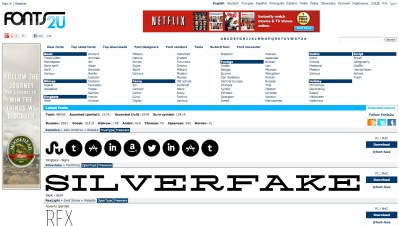
Fonts2u.com

This site has fonts in English from styles ranging from ancient to futuristic. This is a multilingual site that offers fonts in Arabic, Hebrew and Thai, just to name a few

Fonts2u.com

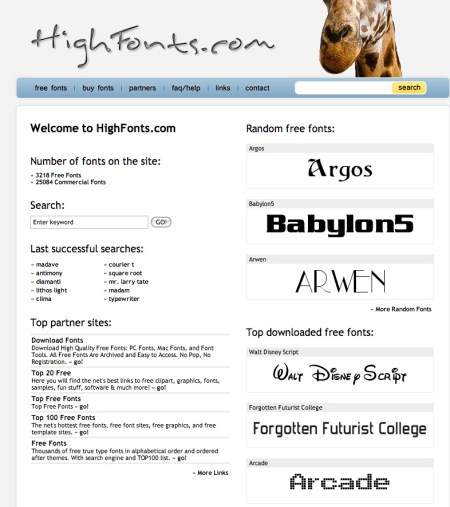
Highfonts.com

This site offers over 300o free fonts, plus 25,000 more fonts for sale. This was the site that has the Disney font.

Highfonts.com - Sarah Eaton blog educator

FFonts.net

This site offers fonts in English and Arabic. They have both free and for-fee fonts in styles ranging from military to movies.

Ffonts Sarah Eaton blog educator

______________
Share or Tweet this post:  Free fonts for everyone – in many languages http://wp.me/pNAh3-1sX

Update – January 2018 – This blog has had over 1.8 million views thanks to readers like you. If you enjoyed this post, please “like” it or share it on social media. Thanks!

Sarah Elaine Eaton is a faculty member in the Werklund School of Education, University of Calgary, Canada.