10 affordable and unique Christmas gift ideas for teachers

December 10, 2012

Swirl of giftsIt is that time of year again when parents and children want to acknowledge teachers’ hard work and commitment to education with a token of appreciation.

Over the years, teachers collect dozens of boxes of chocolates and coffee mugs, so avoid those and instead opt for affordable gifts that your teacher is sure to appreciate. Here are some gift ideas for teachers, educational aides and volunteers, do not cost a lot of money and say “thank you” in a unique way:

1. Specialty tea

Choose black, green or herbal teas that are organic and high quality. Visit a local speciality tea shop and choose one that your teacher will love. Avoid the temptation to present it in a mug though. Many teachers already have a hearty collection of mugs, comprised of previous gifts from students.

2. High quality coffee

If you know for sure that the teacher drinks coffee, then the gift of java will surely be appreciated. Opt for high quality ground coffee unless you know for sure that the teacher uses a coffee grinder. Look for organic, fair trade or direct trade coffee from a local distributor.

3. Hand-made soap or lotion

Body products are another typical holiday gift for teachers, but many of the commercial products contain unhealthy ingredients. Opt for naturally-made, locally produced products that are scent-free or only lightly scented. This increases the chances that teacher will actually use the bath product.

4. A bottle of wine

Only give this gift if you know for sure that the teacher drinks alcohol. If she or he does, then a high quality bottle of wine can go a long way to help a stressed teacher relax once the term is over.

5. A gift card for classroom supplies

Did you know that many teachers buy their own classroom supplies? Some teachers love strolling the aisles of office supply stores, looking at markers, paper, pens, pencils and other classroom supplies. A gift card to an office supply store is a wonderful way to help teachers help kids.

6. A box of elegant, high quality blank cards

An exquisite box of blank cards is a great idea because it means that when the teacher is too busy during the term to go out and buy a special occasion card, they have one handy. Choose high quality paper with a design that can be used for a multitude of purposes.

7. A gift certificate for housecleaning services

This is another great idea from a group of parents. Many teachers find themselves so busy during the term that their house keeping chores just do not get done. If it comes to preparing a lesson plan or cleaning their toilet, teachers will opt to focus on their students. A gift certificate for maid services for a day can provide welcome relief. Choose a well-known service with an excellent reputation.

8. Gift certificates to a locally owned restaurant

Pool resources with a few other parents and buy a gift certificate to a local fancy restaurant. A group gift that allows a teacher to take their special someone out for a complete dinner with wine will be appreciated and remembered for a long time to come.

9. Gift certificates to the movies, live theatre or a concert

This kind of gift sends the message, “You deserve to relax.” A gift certificate or card for entertainment allows the teacher to take a break and forget all the day-to-day stresses of their job.

10. A gift made by you and your child

A gift handmade by your child, together with you, is a surefire way to touch a teacher’s heart. A handmade card, bookmark or other small token is enough to say, “We appreciate you!”

Avoid sugary or sweet gifts such as chocolate, cookies or other sweets. The school staff room is probably full of high calorie treats and many teachers end up laden with boxes of chocolates that they do not particularly want or need.

Instead, show your appreciation to teachers with small, thoughtful gifts that are unique and sure to be appreciated. Choose gifts that do double-duty of helping to support ethical business and local entrepreneurs and you’ll be giving a gift in more ways than one. You are guaranteed a great big smile on the teacher’s face when you do.

Related posts:

_________________

Share or Tweet this: 10 affordable and unique Christmas gift ideas for teachers http://wp.me/pNAh3-1xD

Update – January 2018 – This blog has had over 1.8 million views thanks to readers like you. If you enjoyed this post, please “like” it or share it on social media. Thanks!

Sarah Elaine Eaton is a faculty member in the Werklund School of Education, University of Calgary, Canada.


Freelance teachers and tutors beware: New webinar scam targets professional educators

March 20, 2012

Are you a freelance or contact teacher? Are you interested in offering online courses or webinars?

If the answer to either of these questions is yes, you’ll want to beware of a new webinar scam that targets teachers, trainers, tutors, coaches and consultants. Do not be fooled…

The scam

The scam goes something like this:

You are contacted by a person or organization offering to pay you a handsome sum for a webinar or a one-hour e-learning or Skype tutoring session ($500 to $1000 USD — or more).

You are invited to communicate with the organizers via phone, e-mail or Skype. If you agree to a phone or Skype session, they will keep you on the line, telling how great their organization is and the great results they get for their clients. (In other words, “blah, blah, blah…”)

This introduction could go from anywhere between five and twenty minutes. If you only agree to e-mail, they will likely push for a phone or Skype meeting. They want your undivided attention to engage you in all the hype, get your heart rate up and sweep you up in all their excited sales fluff.

When they think you are suitably convinced, you are then invited to give a webinar (or Skype tutoring session) for them. If you agree, this is where the scam goes into full force…

You will then be told that you will be billed or sent an invoice for $10,000 (or some other outrageous amount) which you must first pay, in order to take part in their program.

So, first they will offer to pay you, then it will be flipped around so that you have to pay them, in order to “be registered”, “be affiliated” or some other such nonsense.

Do not be fooled. The entire purpose of this scam is to get you to give up your hard-earned dollars and give them to someone who does not care about you, your teaching or your programs.

But wait… It gets worse…

You may then be told that they DID told about the costs from the beginning. If you challenge them on this, they will swear up and down that you are wrong. They will claim that they have been perfectly transparent and either you weren’t listening or you were negligent in not paying attention. They may go so far as to indignantly proclaim that you are insulting their professionalism and ethics.

They play with your emotions in order to try to make you feel guilty… This is part of the scam. The idea, of course, is that you’ll feel bad and then cough up the money that you already (supposedly) promised to pay. Do not worry, you are not crazy. You did not promise anything. This is part of their hook.

Do not be taken in by this, or any other con artists.

 Here are tips to avoid being taken in by a webinar scam

  1. Check out every organization or individual who invites you to do a paid webinar or e-learning class for them. Legitimate organizations who are interested in 21st century technologies will almost certainly have a valid website. (Even humble non-profits have websites these days. The site may be badly outdated, but they likely have one.)
  2. Be wary of e-mails coming from a public, free service. Ask yourself, “Why is this person not writing to me from a professional e-mail address?” I say that with tongue in cheek though, because I also use a Gmail account for some of my work… But not all of it. I am also highly searchable on the web, with books published on Amazon with papers published in peer-reviewed journals  and so forth. My point is: Investigate these new “friends”. Make sure they are legitimate and well known in their field.
  3. If the client, school or organization is unknown for you, treat an e-learning program, an online tutoring session or a webinar as any other course you might teach. Get a signed contract. Even the most meagre non-profit organization will agree to a contract for your professional services. Even a simple, one-page agreement will do. I always get an agreement with any school or non-profit I am working with. It helps both sides understand what is expected.
  4.  Trust your instincts. If a deal feels “off”, then it probably is. At the very least, it is likely not a good fit for you. Decline invitations that do not align with your professional values, ethics or area of expertise. Don’t waste your time (or your money) on professional “offers” that feel “off”. There are other organizations out there waiting for you and who would love to work with you.

You are a professional educator, tutor, instructor or presenter and you deserve to be treated as a professional — and get paid for your knowledge and expertise… not be scammed out of your hard earned money.

____________

Share or Tweet this post: Freelance teachers and tutors beware: New webinar scam targets professional educators http://wp.me/pNAh3-1jy

Update – January 2018 – This blog has had over 1.8 million views thanks to readers like you. If you enjoyed this post, please “like” it or share it on social media. Thanks!

Sarah Elaine Eaton is a faculty member in the Werklund School of Education, University of Calgary, Canada.


9 Tips for Successfully Incorporating Virtual Presentations into Your Conference

February 16, 2012

Today I had the coolest experience. My colleagues at Idaho State University (ISU) Workforce Training were having an educational technology conference today in Pocatello. I teach for them online, but today’s conference was live — except for one presenter, me.

Here’s how we did it:

1. Brief your presenter on what to expect

Jeff Hough and the team at ISU gave me a thorough briefing about the conference a few weeks prior to the event. We negotiated the terms of the presentation and they gave me details on what to expect.

2. Tech-savvy conference organizers

These folks specialize in offering professional development webinars for educators. I’ve done dozens of webinars and used the same platform (in this case, Adobe Connect) that the conference organizers had on hand. They knew how to set up their system and had used their webinar platform hundreds of times before. They are adept at all kinds of technology and had significant experience successfully producing webinar presentations.

Sarah Elaine Eaton, virtual, presenter, webinar, education, professional development3. Experienced and energetic virtual presenter

Modesty aside, it is safe to say that I know how to give a virtual presentation. I have colleagues who flatline in a webinar environment because they “need the crowd to give them their energy”. At today’s conference, I never saw my audience. Well, not until after when one of my ISU colleagues, Paul Dickey, tweeted this photo (which I saw after the presentation).

Some of the worst virtual workshops or keynotes I have seen have been given by people who have no experience or webinar training. (In case you’re interested, here’s how you can get trained).

4. Previously presented material

Ensure the presentation has been tested. The conference organizers asked me to repeat a Twitter for Teachers workshop that I had taught for them previously. They had already seen the program delivered via webinar and liked it. The program had already proven to be a success.

Conference organizers want their attendees to have a stellar experience. Many things can go wrong with a virtual presentation. Make sure the presenter’s content is not one of them.

5. Do a connectivity test

Before the conference, we tested all the technology we were going to use – audio, video, slides and a real-time screen share. Hotels and conference centres are notorious for having poor wireless connections. The more people who tap into them, the slower they get. Virtual presentations chew up a lot of bandwidth. Even if your system works perfectly at the office, having a new venue changes the game. Every single piece of tech needs to get tested… and tested again.

As we prepared for today, we had some issues with the audio. We made some adjustments that helped significantly when the room was filled with a live audience.

6. Expect the unexpected

At one point during today’s session, we lost audio. Because we were all experienced working in a virtual environment and were aware of our audio problems during the connectivity test, it came as no surprise when the audio cut out. We were quickly able to work things through and I picked up where I had been cut off. Both the conference organizers and the presenter need to be able to keep their cool when “tech happens” in front of a room full of people.

Every person involved in today’s virtual program understood what aspects of the production we could control, such as our individual mics and computer settings and which we could not control, such as the venue’s wireless connection cutting out. Knowing what you can and can not control puts you in a better position to problem solve on the fly.

7. Include real-time interactivity

In my case, Jeff acted as a host for the session, introducing me and then fielding questions from the audience. At the beginning of the session, I said, “OK, let’s do a show of hands in the room. How many people use Twitter right now?”

Jeff acted as my eyes and ears and reported back to me, “There are crickets in the room, Sarah,” meaning that there was silence. He then added, “There are maybe four hands up.”

“O.K.,” I said. “That is less than 10% of the room. Let’s see if we can’t increase that by the end of the presentation…”

We stayed in constant contact throughout the session, talking back and forth, naturally and with a conversational tone.

8. Show, don’t tell

There is a certain amount of “telling” in an instructional program, but try to limit it as much as possible.

My presentation included a combination of static slides and a real-time screen share. I was showing folks how to use Twitter, so I demonstrated it live. Because Jeff also has a Twitter account, we were able to Tweet back and forth in real time and the participants could see it on screen.

The highlight for me as a presenter came when one participant signed for Twitter during the presentation and Tweeted “@DrSarahEaton“, as I had shown them how to do moments earlier.

I noticed it on my feed and said, “Hey, who’s that? Is that someone who’s in the conference room right now?”

Jeff asked the brand-new-baby-Tweeter to raise his or her hand. She did.

This was the single best moment for me as a virtual presenter. It was completely unrehearsed and unexpected. We had no idea anyone was going to sign up for Twitter right then and there and start putting the content into action at that very moment.

It caught the attention of every single person in the room and suddenly, it all made sense. What I had been saying about educators being able to connect in real time from all over the world, was no longer something I said, it was something we were able to actually show them. It was the coolest thing.

After that, a few other people joined in and sent Tweets, too.

Jimeny Cricket may have talked, but these crickets Tweeted! It was brilliant.

9. Give participants a valuable handout

Participants did not get a copy of my presentation slides. (Bor-ing!) Instead, every participant received a copy of the Twitter for Teachers manual that I did to accompany the course. It is a 25-page, step-by-step how to guide that steps them through the exact processes I showed during the presentation, in exactly the same order. Well, except for the spontaneous moments that made the session come alive.

The technical aspects of a virtual presentation increase your risk of failure significantly. Just about anything can go wrong. Even with all the preparation in the world, the potential for unexpected screw ups can still happen. Lots of preparation helps to mitigate that risk. Having an experienced team who have worked together before also helps tremendously.

You know when a virtual presentation has been truly successful because the webinar technology becomes “invisible”. When participants are so into the experience that they almost forget their presenter is hundreds, if not thousands of miles away and their sense of distance has melted away, you know you’ve just incorporated a great virtual presentation into your conference.

A personal thanks from me to all the folks at ISU Workforce Training. As any experienced virtual presenter knows, those work on the production team are the real stars of the show.

_____________

Share or Tweet this post: 9 Tips for Successfully Incorporating Virtual Presentations into Your Conference http://wp.me/pNAh3-1fm

Update – January 2018 – This blog has had over 1.8 million views thanks to readers like you. If you enjoyed this post, please “like” it or share it on social media. Thanks!

Sarah Elaine Eaton is a faculty member in the Werklund School of Education, University of Calgary, Canada.


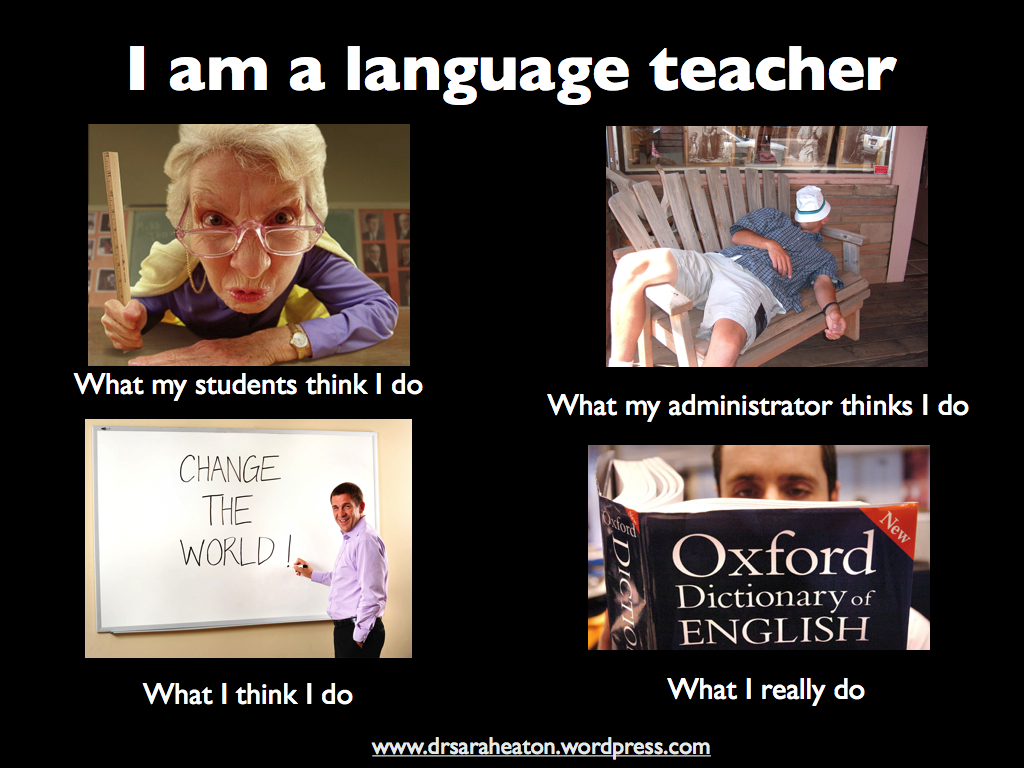
“I am a language teacher”: A picture says a thousand words

February 16, 2012

I’ve seen a few of these photo collections flying around the Internet recently. This is one I did up… just for fun.

Sarah Elaine Eaton I am a language teacher speaker presenter humor funny

You have my permission to share it… Just leave the blog link at the bottom, please. 😉

____________________________

Share this post: “I am a language teacher”: A picture says a thousand words  http://wp.me/pNAh3-1fb

Update – January 2018 – This blog has had over 1.8 million views thanks to readers like you. If you enjoyed this post, please “like” it or share it on social media. Thanks!

Sarah Elaine Eaton is a faculty member in the Werklund School of Education, University of Calgary, Canada.


Scribd for Teachers: How to Publish and Share Your Documents Online

February 7, 2012

Today’s webinar, offered through ISU Workforce Training, was, Scribd for Educators and Trainers: How to share your own documents, writing and resources on line.

Scribd is the world’s largest online social reading and publishing site. Anyone can join. You can read others work and contribute your own materials, too. Well known writers and thought leaders such as Seth Godin and major publishing houses such as Simon & Schuster have Scribd accounts.

Whether it’s the novel you’ve always wanted to publish or a grading rubric for a science project you’ve developed, you can share your work with others who are keen to learn from you.

Here is what the webinar covered:

  1. Learn the basics of how to set up a Scribd account. It’s easy and it’s free.
  2. Learn how to upload documents. Get tips on what works and what doesn’t.
  3. Learn how to categorize your documents appropriately for maximum exposure.
  4. Learn how to make your documents freely shareable or restrict the reader’s ability to copy and paste your work.

I told the participants that “by the end of this webinar, you will have knowledge that you can apply immediately to set up your own account and start sharing your work.”

Here is the manual that I shared with today’s participants:

View this document on Scribd

____________________________

Share this post:  Scribd for Teachers: How to Publish and Share Your Documents Online http://wp.me/pNAh3-1dD

Update – January 2018 – This blog has had over 1.8 million views thanks to readers like you. If you enjoyed this post, please “like” it or share it on social media. Thanks!

Sarah Elaine Eaton is a faculty member in the Werklund School of Education, University of Calgary, Canada.