Have you noticed an increasing amount of spam messages coming to your LinkedIn inbox? I have.
A few years ago, I adopted a LinkedIn Open Networking (LION) policy. I would accept connections from anyone who requested one. I have recently changed my mind on that for one single reason: Inbox spam.
The topic of LinkedIn spam has been growing online. This commentary by Andy Lopata in the Huffington Posts questions whether LinkedIn will sink in a sea of spam.
Lopata reminds us that LinkedIn can be a valuable professional networking tool, but that potential is often not realized. Sinking into spam tactics is bringing down the value of the social networking platform for all users.
Characteristics of LinkedIn spam
I have heard that technically, “Inmail” isn’t spam, but rather a message from a Linked in contact. I disagree with that. Spam is unsolicited virtual junk mail, no matter how it arrives. Spam messages are rarely personally addressed and even if they are, the content is generic. The content is not personalized or individualized. The hallmark of spam is that it is really never about you. It’s about them, their product, their website, their business, their search engine rankings, their whatever.
These direct messages seem to fit into one of these categories:
“Like” spam
I first heard this term from Daylan Pierce who wrote about it on his blog. This type of spam essentially asks you to “like” this or that. The reason people do this is that the more “likes” post gets, the higher it boosts their ranking in social media. If people really do enjoy a post or a resource, they’ll take it upon themselves to share it anyway.
Invitations
These are either sales pitches or calls for action that are couched as “invitations”. They are not actual invitations, but rather a mass message asking to you buy a product, visit a website, sign up for a program, etc.
Requests for reviews or feedback
As an academic, I have written reviews of professional products that have been published in peer-reviewed scholarly journals. This is very different from LinkedIn spammers who send mass messages with requests for feedback on their latest product or project. If I’m going to spend my time reviewing a new product and then share that feedback in a public way, it is likely going to be a resource that really piques my interest. Spam messages do not pique my interest. LinkedIn spam messages asking me to visit a website (i.e. drive traffic to the website, for the purpose of driving its search engine rankings) and leave a comment (i.e. increase activity on the website, for the purpose of driving up its search engine rankings) get deleted, not reviewed.
Sponsorship requests
As if calls on a weekly basis from telemarketers asking me to donate to a cause weren’t enough, now requests come via LinkedIn spam. Here’s a hint: I won’t support spamming… or causes that ask for donations using this method. There are plenty of good causes out there that get my donation dollars. The recent flooding in my home town of Calgary is a good example.
“Check out my latest __________” requests
Requests to check out the contact’s latest blog post, YouTube video, webinar or whatever is just an attempt to drive traffic to their sites.
I now have a new policy: If you spam me via my Inbox on LinkedIn, I delete you as a contact. No reply. No questions asked.
How to remove LinkedIn contacts
It is not an intuitive process to remove a LinkedIn contact. You have to go through several steps to do it. Here’s how:
Note down the name of the person you want to delete as a contact.
Click on Network. This will produce a drop-down menu.
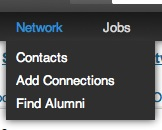
Click on Contacts.
This will produce a list of your contacts.
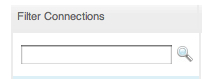
On the left-hand side menu there is a box to Filter Contacts.

In that box, enter the name of the person you want to delete. Hit enter.
That should produce a search result of the unwanted contact.
Check the box next to his or her name.
Then, in the upper-right hand side of your screen, click on “Remove connections”. That choice is on the far right of your screen:

This is a bit of a laborious process, but it is worth it. I have found that once someone starts spamming you with Inbox message, they do not stop.
Why I am no longer a LinkedIn Open Networker (LION)
I admit it. For me, being a LinkedIn Open Networker has failed. Instead of widening my network in an open and inclusive manner, open networking has filled my Inbox with unwanted messages that are a waste of time and energy.
I rarely send LinkedIn mail any more. When I do send Linked InMail, it is personalized, specific, to the point, and of legitimate value to the person or people I am writing to.
On occasion, I have received a message from someone I know personally who is working hard to build a new business or brand. If they send me a message asking me to visit their website or like something, I will do that for them… but the reason I do is because I know them personally. We already have a relationship and they are asking for a favor. I know, intuitively, that if I were to ask for a similar favor that they would do the same for me. The difference is the depth of our relationship and a sense of loyalty to one another. Spammers often do not even know who you are… They just spam everyone in their address book. There’s no depth to the relationship, no trust and no foundation of history or loyalty that justifies asking for a favour.
LinkedIn can be a powerful professional networking tool. Building trusting professional relationships takes time and effort… and it starts with caring about the other person as both a professional and a human being. Let your sense of personal leadership and a desire to cultivate meaningful professional relationships drive your LinkedIn (and all social media) activity.
Related post: De-grouping on LinkedIn to be a more effective leader http://wp.me/pNAh3-1De
_____________________
Share or Tweet this: How to delete LinkedIn contacts who spam you (and why you should) http://wp.me/pNAh3-1CO
Update – January 2018 – This blog has had over 1.8 million views thanks to readers like you. If you enjoyed this post, please “like” it or share it on social media. Thanks!
Sarah Elaine Eaton is a faculty member in the Werklund School of Education, University of Calgary, Canada.
 I just deleted 5000 messages from my e-mail box without reading any of them. I admit it: I am an e-mail hoarder. I save all kinds of messages that I don’t need to.


 Posted by Sarah Elaine Eaton, Ph.D.



 Learning, Teaching and Leadership
You must be logged in to post a comment.