12 Tips to incorporate blogging into your classes

August 2, 2012

In a recent Master’s of Education course I taught at the University of Calgary, blogging was a required assignment for the students. The program coordinator (my boss) urged me to have the students blog as part of their course. She let me know that the students were enrolled in a graduate certificate program and that the course I was teaching was the first course of their certificate. She said that the certificate had been set up so that students would blog throughout their entire learning experience, as part of every course in their certificate.

The course I taught was on incorporating technology into educational practice. As an avid blogger myself, I was excited by the prospect of incorporating blogging into my teaching practice.

Most of the students were teachers themselves and some of them were technology leaders in their schools, but only one had her own blog.

After having incorporated “blogging for learning” into my teaching practice, here is what I learned:

1. Recommend a blogging service.

We (meaning the course coordinator and I) did not restrict what blogging service the students chose, but we recommended a few (including WordPress and Blogger). We recommended free sites and suggested that students not pay to register their own domain (at least, not to start).

 2. Show students the nuts and bolts of how to set up a blog.

I spent approximately 30 minutes in one class, showing students the “behind the scenes” of my own WordPress blog. Using an LCD projector, hooked up to a computer with an Internet connection, I took my students on a virtual tour of my own WordPress dashboard. I showed them how to choose a theme, write a post and then publish that post. They appreciated the demo and it gave them confidence to get started.

3. Give them time to set up their blog.

One student reported that it took her two hours to set up her blog. This included familiarizing herself with the dashboard, selecting a theme and figuring out how to post. Even for those who are into technology, setting up your first blog can seem overwhelming until you get the hang of it. The students needed dedicated time to figure out the practicalities of their blog.Sarah Elaine Eaton, speaker, presenter, keynote, technology, social media, Calgary, Canada, educator, education, professional development

 4. Link the blogs to the course content.

Emphasize that the topics that students post on need to relate to the cours content. Topics covered in class or questions raised during class were some suggestions. At times, I would encourage students to think about their blog by saying in class, “That is good fodder for a blog post.” This helped them to think about what a learning blog is and what topics make for good blog posts.

5. Assign a certain number of postings.

In our course, students had to publish a minimum of four posts throughout their course. Their instructions included “keeping up-to-date with postings throughout the course”. About half of the students were able to do this. The other half waited until the end of the course and then published three or four postings at once. Many students admitted to having their blogs in draft form, but did not feel ready to publish them.

6. Assign a minimum number of words for each post.

In our course, students’ blog posts had to be a minimum of 200 words. This meant that writing was part of the assignment. It was not enough to post a graphic or a video without a reflective response.

7. Encourage multimedia.

In addition to the 200 words, I encouraged students to post videos, graphics, Wordles and other multimedia to their blogs. Since our course was about incorporating technology into inquiry-based learning, this was appropriate. Some students were able to incorporate media quite easily, but others struggled with this.

8. Encourage students to include a blogroll.

Students were expected to read and comment on each other’s posts. To help them with this, we had each student post their blog address in our online class Blackboard site. I encouraged each student to include a blog roll on their own blogs, so they could easily access each other’s blogs. Not all the students figured out how to do this, but most of them were able to set up a blog roll. This helped them to keep track of each other’s blogs more easily.

9. Include commenting and interactivity as part of the assignment.

Part of the learning task included students commenting on their classmates’ blog posts at least twice. These comments counted as part of their grade for the assignment. Students were asked to post thoughtful and reflective comments that went beyond “Good post!” or “I liked this”. This proved to be problematic at the beginning, as some students had difficulty figuring out how to approve comments. Until they did, their peers’ comments did not show up on their blogs. Once the students figured out how to approve each other’s comments, this went much more smoothly.

10. Talk about blogging in class.

Not only did I highlight topics or questions that would make good blog posts, we also talked about the process of blogging in class. One student was excited to announce that someone from another country had read her blog post and “liked” it, using the “like” button in WordPress. Until then, she had no idea that anyone outside our class might read her blog posts. Knowing that another educator, whom she did not know, read and liked her post gave her great inspiration to keep writing. Her story also inspired the other students to think about how blogging can help them connect with others on a broader scale.

11. Differentiate between a personal and professional / educational blog.

Not only did I provide written instructions on the course outline, I also supported the written instructions with an in-class demo and ongoing discussions in class about blogging and how to use blogging for learning or professional teaching purposes. A couple of students had trouble figuring out how blogging for class differed from personal blogging. We talked about how a personal blog might include more family photos, recipes or other personal information, while a professional learning blog would include topics more focussed on work and our professional lives.

12. Help students find their blogging voice.

I made it clear that since the students were also professionals and teachers, that their blog was an extension of their professional selves. Some students initially found this a bit diffiult and said that they did not know what tone of voice to use in their blog. We had a conversation about language register and how a learning blog was one step down from a formal research paper and probably one step up from very informal conversations. By the end of the course, most of the students had found a happy medium.

Overall, the process of working with these adult learners (who are also teachers) in helping them learn how to blog was both challenging and rewarding. In the beginning, I had assumed (incorrectly) that since they had high levels of technology literacy and many of them teach tech as part of their professional practice, that they would find it easy to blog. In reality, it took time for them to learn the nuts and bolts of how to blog, to learn what topics made for a good blog post and to learn how to find their voice as a blogger.

In the end, they did extremely well with their blogs and I have subscribed to all of them. I am excited to see how they progress with blogging in thier next course.

_____________________

Share or Tweet this post: 12 Tips to incorporate blogging into your classes http://wp.me/pNAh3-1t8

Update – January 2018 – This blog has had over 1.8 million views thanks to readers like you. If you enjoyed this post, please “like” it or share it on social media. Thanks!

Sarah Elaine Eaton is a faculty member in the Werklund School of Education, University of Calgary, Canada.


Free fonts for everyone – in many languages

July 30, 2012

These sites offer a plethora of free fonts, not only for teachers, but for everyone. I have downloaded fonts from all of these sites. Sometimes the fonts are a little glitchy to install and sometimes they work very easily. For me (on a Mac) all these sites have been virus and spyware free, but as usual… take precautions when downloading anything from the Internet. What I like best about these sites is the variety. I especially like that you can download fonts for movies and TV shows such as the Disney, Battlestar Galactica or Babylon 5 fonts:

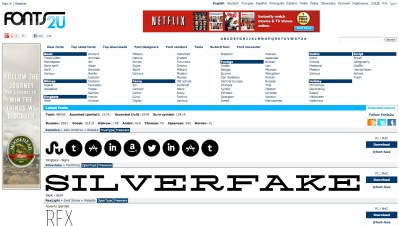
Fonts2u.com

This site has fonts in English from styles ranging from ancient to futuristic. This is a multilingual site that offers fonts in Arabic, Hebrew and Thai, just to name a few

Fonts2u.com

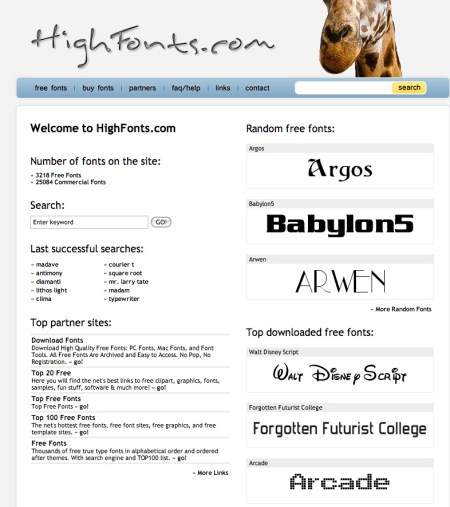
Highfonts.com

This site offers over 300o free fonts, plus 25,000 more fonts for sale. This was the site that has the Disney font.

Highfonts.com - Sarah Eaton blog educator

FFonts.net

This site offers fonts in English and Arabic. They have both free and for-fee fonts in styles ranging from military to movies.

Ffonts Sarah Eaton blog educator

______________
Share or Tweet this post:  Free fonts for everyone – in many languages http://wp.me/pNAh3-1sX

Update – January 2018 – This blog has had over 1.8 million views thanks to readers like you. If you enjoyed this post, please “like” it or share it on social media. Thanks!

Sarah Elaine Eaton is a faculty member in the Werklund School of Education, University of Calgary, Canada.


Where the Grass is Greener: How to Learn Anywhere (A year of inspired insights #9)

July 24, 2012

Don’t you just hate being cooped up in a classroom during the summer?

When I teach language during the summer months, I often take my university class outside to sit on the grass. We take our textbooks with us and do our lesson sitting in a circle somewhere quiet outside. For the most part, I try to stick with the lesson that we have planned for that day. It makes me sad that much of my teaching career has been governed too heavily by a curriculum that dictates what we must learn on any given day.

Every now and then, I rebel. The results are as inspiring as they are effective.

Once I told my students to forget about the textbook. I said, “Much of the real world vocabulary that we need to know is not in the textbooks. And a lot of what is in the textbook is not really useful in the real world. Look around. What are some every day items that you do not know the names for? Point or use the phrase we have learned in class for “How do you say…?”

We spent the entire hour learning vocabulary of every day items that were all around us.  We spoke only in the target language. Students learned to be resourceful with their body language to point, shrug and use facial expressions to express what they wanted to learn.

The students were engaged and energized. They were learning words that made sense to them in a real-wold context. They also realized how much they did not know… and how much they wanted to learn.

We not only said the words aloud, we made lists of the words. I spelled the words out using the alphabet. This encouraged them to listen closely and practice using the alphabet to spell out words.

Once we had a list of forty words or so, we began to categorize them. We came up with categories together that included: “nature” (grass, trees, etc.), “buildings” (library, student centre, etc.), “structures” (bench, stairs), “art” (poster, statue) and “other things you find outdoors” (bus stop, garbage can, etc.)

We not only learned vocabulary, we practiced spelling, listening, non-verbal communication and critical thinking skills to group the vocabulary words in a logical manner.

Often, finding inspiration in a textbook is difficult. But learning, that can happen anywhere.

5 Strategies to Learn Anywhere

1. Ditch the textbook. It may not be possible to avoid using a textbook most of the time, but every now and again, a teacher’s creativity, experience and wisdom are enough to shape an effective learning experience.

2. Involve the students in the learning design. Ask them what they want to learn. If you are using a “learn anywhere” approach for a second language, challenge your students to communicate using the target language. Also, have them tap into their inner resilience and problem-solving skills to use body language and gestures to communicate.

3. Incorporate scaffolding. In the activity I shared with you above, we looped back to the alphabet they had learned some weeks earlier. They had to work hard to remember it and use it again in an authentic context. As you incorporate previous knowledge and skills they have learned, you encourage them to internalize them even more.

4. Create order from chaos. After we did some brainstorming and generated numerous vocabulary words, we began to categorize them. This helped the students organize the material they had just learned in a meaningful way. The idea is not to impose order, so much as create it. The students had a say in the categories we developed. There is nothing wrong with random learning, but organizing the new material can help some students make sense of it.

5. Relate your learning to the real world. There is no point of learning in the real world if it is just an academic exercise. Get students to think about how and when they would use what they have learned. Link something as simple as learning new vocabulary to real world skills such as learning how to ask the names of things. This builds their resourcefulness and problem-solving skills.

Learning is a lifelong process. The opportunity to learn new knowledge and skills are around us every day. I love books, and I also believe that there is as much (if not more) to be learned outside books, as can be learned from inside them.

Go outside and learn this summer.

Related posts:

A year of inspired insights #8: A language teacher’s legacy

A year of inspired insights #7: What to do when a student hates technology

A year of inspired insights #6: You can raise me up: The lasting impact of a teacher’s words

A year of inspired insights #5: When reason falls on deaf ears

A year of inspired insights #4: How teaching Spanish to a deaf multilingual student opened my eyes

A year of inspired insights #3: Servant leadership in the scullery

A year of inspired insights #2: Conversations change everything

A year of inspired insights #1: There’s a silver lining in every ambulance

My 2012 resolution project: A year of inspired insights

_____________

Share or Tweet this post: Where the Grass is Greener: How to Learn Anywhere http://wp.me/pNAh3-1su
If you are interested in booking me (Sarah Eaton) for a presentation, keynote or workshop (either live or via webinar) contact me at sarahelaineeaton (at) gmail.com. Please visit my speaking page, too.


Marketing and promoting literacy with webinars

June 20, 2012

Marketing and promoting literacy with webinars (cover) - Sarah Elaine EatonAre you interested in using webinars or webcasting in your literacy organization? This report offers practical suggestions for literacy practitioners and program administrators on how to use webinar technology to promote and market literacy. The report is divided into sections that offer ideas on webinars for learners, for staff and volunteers and for the general public.

A checklist is provided of helpful tips on how to make your webinar day a success.

This report is available for free as a downloadable .pdf from Onate Press.

_______________________

Share or Tweet this post: Marketing and promoting literacy with webinars http://wp.me/pNAh3-1rj

If you are interested in booking me (Sarah Eaton) for a presentation, keynote or workshop (either live or via webinar) contact me at sarahelaineeaton (at) gmail.com. Please visit my speaking page, too.


How to provide peer review feedback

June 6, 2012

There is no single correct way to conduct a peer review of a writer’s manuscript or submission to a journal. Every publication will have its own guidelines and standards. However, if you are brand new to reviewing a peer’s work here are some factors to consider:

Organization and structure

  • Does the work have a clearly articulated title?
  • Is the work organized and structured in a logical manner?
  • Does the manuscript contain explicit headings, making it easier for you to read?

Introduction

  • Does the introduction articulate the point of the paper?
  • Does the introduction contain key words and phrases to help readers find the paper once it is in circulation?
  • Does the introduction clearly establish the value of the paper?

The problem / context / research question

  • Does the writer provide a clearly articulated research question or problem?
  • Is this problem situated in a historical, geographical and professional context?
  • Is this question original? If this sounds like something that has been studied to death, then it is unlikely to be original. Journal articles are meant to contribute new knowledge, fresh perspectives to the ongoing dialogue in the field.

Significance of the work

  • What rationale does the writer provide for his or her work?
  • Does the writer link their manuscript to the particular journal he or she has chosen? Many writers submit manuscripts without targeting them to a particular journal or relating their manuscript to the theme or purpose of the journal. Reviewers regularly reject such articles.
  • Why should we, as readers and professionals, care about this manuscript?

Discussion and argument

  • Does the author define and develop a cogent argument?
  • Is the argument logical?
  • Does the argument influence and persuade you as a reader?
  • How sophisticated is this argument?

Conclusions

  • Has the author provided clear and succinct conclusions?
  • Are the conclusions logically linked to the introduction and the argument?
  • Has the author restated the relevance of this research, in terms of already-published literature in the field?
  • Does the conclusion highlight the significance of the author’s manuscript in the larger research and professional context?
  • Has the writer provided directions for future research or recommendations for professional practice?

References

  • Are all the references mentioned in the body of the paper cited properly in the References section at the end of the paper? (Manuscripts with missing references are almost always automatically rejected by journals.)
  • Do the references at the end of the paper meet style guide standards, such as APA or Chicago style? (Sloppy references are also cause for rejection.)

General assessment

Is this a manuscript you think is worthy of publication? Why or why not? What changes would strengthen it in order to make it suitable for publication? Provide recommendations for revision.

Your mission is to objectively examine the work as a professional and scholarly critic. This is not an exhaustive list of criteria to consider, by any means. It is a list to give the novice manuscript reviewer a place to start.

______________

Share or Tweet this post:  How to provide peer review feedback http://wp.me/pNAh3-1qH

____________________________________________________

This blog has had over 1,000,00 views thanks to readers like you. If you enjoyed this post, please “like” it or share it on social media. Thanks!