Gemini Live: Breaking Educational Barriers with AI

April 19, 2025

Gemini Live is Google’s new conversational AI assistant that responds to voice commands in real-time. Unlike text-based interactions, Gemini Live allows for natural, flowing conversations. This voice-first approach opens new possibilities for accessibility in educational settings. It was released last month, and I just got around to trying it today. Here’s how it went:

I was impressed by the tool’s interactivity and speed. In this test I scanned a laptop sticker with the hashtag #UHaveIntegrity, which is from our academic integrity campaign at the University of Calgary. The app correctly identified it and gave me a brief description.

I did a few subsequent tests with other items afterwards. It did not always have 100% accuracy, but with additional prompting, it corrected errors and provided updated information.

I can think of a variety of uses for this kind of app for teaching and learning. In particular, I am excited about the possibilities to enhance accessibility, inclusion, and equity.

Breaking Down Barriers with Voice Interaction

The voice interface of Gemini Live can remove some barriers for students. Students with mobility limitations, visual impairments, or reading difficulties can participate in learning activities through speech. This creates a more level playing field in the classroom.

Imagine a scenario where a teacher uses Gemini Live to help a student with dyslexia engage with research projects. The student could ask questions verbally and receive information without struggling with text. This hypothetical case illustrates how voice interaction might lead to increased confidence and class participation.

Multilingual Support for Diverse Classrooms

Language barriers often create obstacles in education. Gemini Live supports multiple languages and can translate between them. This feature helps:

  • Non-native English speakers follow lessons in their first language
  • International students integrate into new learning environments
  • Teachers communicate with students from different linguistic backgrounds
  • Parents who speak other languages stay involved in their children’s education

Learning Accommodations Made Simple

Every student learns differently. Gemini Live can adapt content to different learning needs. Here are some examples:

  1. It can explain complex concepts in simpler terms for students who need additional support
  2. It provides alternative explanations when students don’t understand a topic the first time
  3. It offers audio descriptions of visual content for visually impaired students
  4. It can generate study materials in different formats to match learning preferences

Real-Time Assistance in the Classroom

Teachers often struggle to provide individual attention to every student in a classroom. Gemini Live can serve as an additional resource that students can turn to when they need help. This can reduce wait times and frustration.

As a hypothetical example, a high school math teacher could implement Gemini Live as a ‘homework helper’ station in the classroom. Students who get stuck on problems could ask Gemini Live for guidance without waiting for the teacher to become available. This approach would allow more students to receive timely support while waiting for personalized attention from their teacher.

Digital Equity Through Voice Access

Not all students have equal access to technology or equal ability to use traditional interfaces. Voice technology lowers the technical barriers to using digital tools. Students without keyboards, mice, or touchscreens can still access information and complete assignments through voice commands.

Practical Implementation Tips

In thinking about how we could use use Gemini Live and similar tools for accessibility and inclusion, here are some ideas:

  • Create specific prompts that students can use to get help with different subjects
  • Set up dedicated stations where students can interact with Gemini Live
  • Teach students how to ask effective questions
  • Combine Gemini Live with other AI tools for a comprehensive accessibility solution

Challenges and Considerations

It is important for teachers to be aware that the tool is not perfect (at least as it currently stands). Although Gemini Live offers benefits, it currently has certain limitations.

  • Voice recognition may struggle with some speech patterns or accents
  • Private conversations require appropriate spaces to avoid classroom disruption
  • Students need guidance on when AI assistance is appropriate and when it isn’t
  • Technology should supplement, not replace, human teaching and interaction

Looking Forward

As AI assistants like Gemini Live continue to evolve, they will provide even more tools for inclusive education. The most successful classrooms will be those that thoughtfully blend technology with human instruction.

By incorporating Gemini Live into teaching practices, educators can create learning environments that accommodate more students. The goal isn’t just to make education accessible but to ensure every student feels valued and included in the learning process. When we remove barriers to education, we unlock potential — and that’s one of the most fun parts of being an educator.

–——–-

Share this post: Gemini Live: Breaking Educational Barriers with AI – https://drsaraheaton.com/2025/04/19/gemini-live-breaking-educational-barriers-with-ai/

This blog has had over 3.7 million views thanks to readers like you. If you enjoyed this post, please ‘Like’ it using the button below or share it on social media. Thanks!

Sarah Elaine Eaton, PhD, is a Professor and Research Chair in the Werklund School of Education at the University of Calgary, Canada. Opinions are my own and do not represent those of my employer. 


Embracing AI as a Teaching Tool: Practical Approaches for the Post-plagiarism Classroom

March 23, 2025

Artificial intelligence (AI) has moved from a futuristic concept to an everyday reality. Rather than viewing AI tools like ChatGPT as threats to academic integrity, forward-thinking educators are discovering their potential as powerful teaching instruments. Here’s how you can meaningfully incorporate AI into your classroom while promoting critical thinking and ethical technology use.

Making AI Visible in the Learning Process

One of the most effective approaches to teaching with AI is to bring it into the open. When we demystify these tools, students develop a more nuanced understanding of the tools’ capabilities and limitations.

Start by dedicating class time to explore AI tools together. You might begin with a demonstration of how ChatGPT or similar tools respond to different types of prompts. Ask students to compare the quality of responses when the tool is asked to:

  • Summarize factual information
  • Analyze a complex concept
  • Solve a problem in your discipline
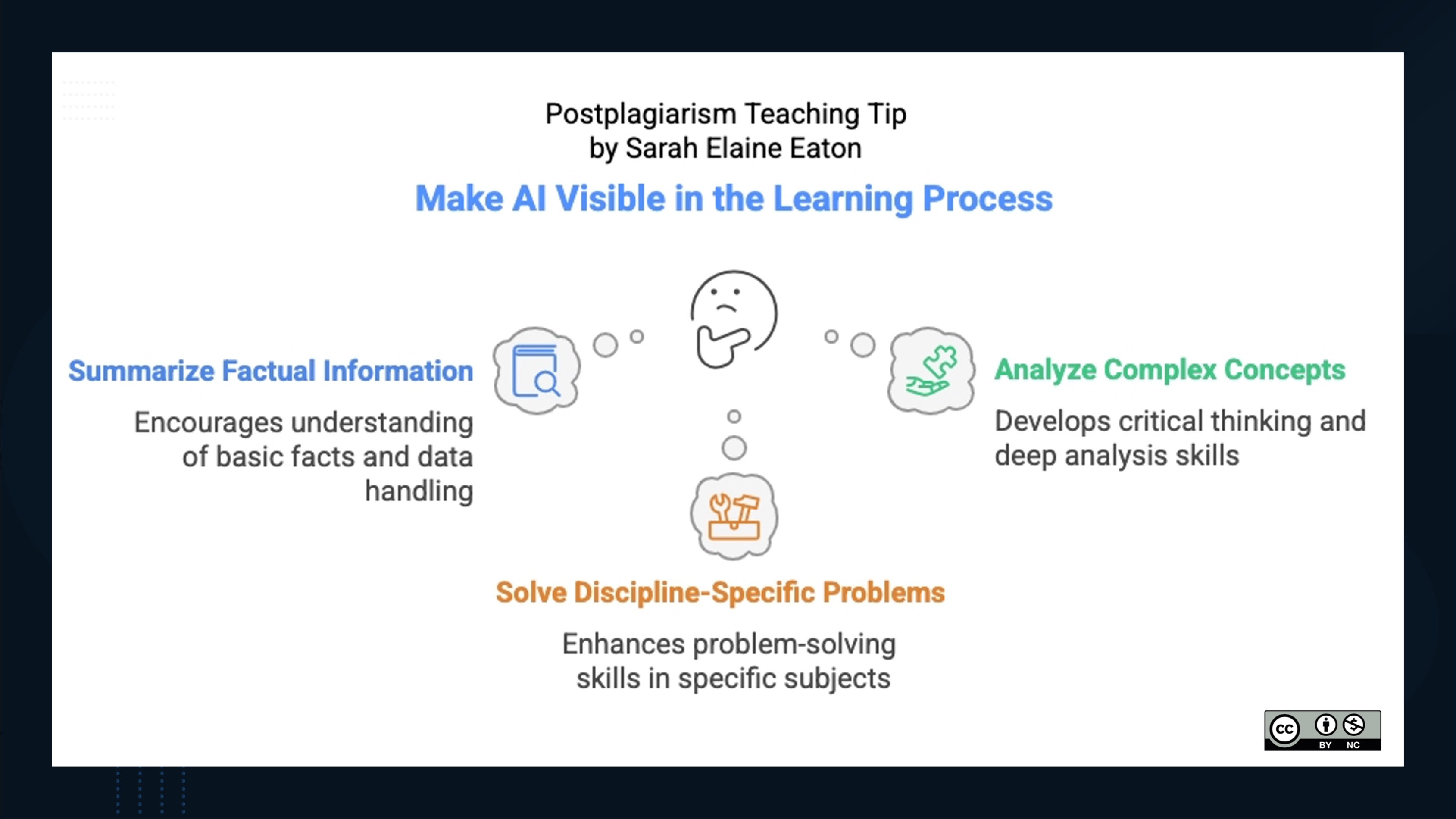
A teaching tip infographic titled "Postplagiarism Teaching Tip by Sarah Elaine Eaton: Make AI Visible in the Learning Process." The infographic features a central image of a thinking face emoji, with three connected bubbles highlighting different aspects of AI integration in learning:

Summarize Factual Information (blue): Encourages understanding of basic facts and data handling, represented by an icon of a document with a magnifying glass.

Analyze Complex Concepts (green): Develops critical thinking and deep analysis skills, represented by an icon of a puzzle piece.

Solve Discipline-Specific Problems (orange): Enhances problem-solving skills in specific subjects, represented by an icon of tools (wrench and screwdriver).
In the bottom right corner, there’s a Creative Commons license (CC BY-NC) icon.

Have students identify where the AI excels and where it falls short. Hands-on experience that is supervised by an educator helps students understand that while AI can be impressive and  capable, it has clear boundaries and weaknesses.

From AI Drafts to Critical Analysis

AI tools can quickly generate content that serves as a starting point for deeper learning. Here is a step-by-step approach for using AI-generated drafts as teaching material:

  1. Assignment Preparation: Choose a topic relevant to your course and generate a draft response using an AI tool such as ChatGPT.
  2. Collaborative Analysis: Share the AI-generated draft with students and facilitate a discussion about its strengths and weaknesses. Prompt students with questions such as:
    • What perspectives are missing from this response?
    • How could the structure be improved?
    • What claims require additional evidence?
    • How might we make this content more engaging or relevant?

The idea is to bring students into conversations about AI, to build their critical thinking and also have them puzzle through the strengths and weaknesses of current AI tools.

  • Revision Workshop: Have students work individually or in groups to revised an AI draft into a more nuanced, complete response. This process teaches students that the value lies not in generating initial content (which AI can do) but in refining, expanding, and critically evaluating information (which requires human judgment).
  • Reflection: Ask students to document what they learned through the revision process. What gaps did they identify in the AI’s understanding? How did their human perspective enhance the work? Building in meta-cognitive awareness is one of the skills that assessment experts such as Bearman and Luckin (2020) emphasize in their work.

This approach shifts the educational focus from content creation to content evaluation and refinement—skills that will remain valuable regardless of technological advancement.

Teaching Fact-Checking Through Deliberate Errors

AI systems often present information confidently, even when that information is incorrect or fabricated. This characteristic makes AI-generated content perfect for teaching fact-checking skills.

Try this classroom activity:

  1. Generate Content with Errors: Use an AI tool to create content in your subject area, either by requesting information you know contains errors or by asking about obscure topics where the AI might fabricate details.
  2. Fact-Finding Mission: Provide this content to students with the explicit instruction to identify potential errors and verify information. You might structure this as:
    • Individual verification of specific claims
    • Small group investigation with different sections assigned to each group
    • A whole-class collaborative fact-checking document
  3. Source Evaluation: Have students document not just whether information is correct, but how they determined its accuracy. This reinforces the importance of consulting authoritative sources and cross-referencing information.
  4. Meta-Discussion: Use this opportunity to discuss why AI systems make these kinds of errors. Topics might include:
  • How large language models are trained
  • The concept of ‘hallucination’ in AI
  • The difference between pattern recognition and understanding
  • Why AI might present incorrect information with high confidence

These activities teach students not just to be skeptical of AI outputs but to develop systematic approaches to information verification—an essential skill in our information-saturated world.

Case Studies in AI Ethics

Ethical considerations around AI use should be explicit rather than implicit in education. Develop case studies that prompt students to engage with real ethical dilemmas:

  1. Attribution Discussions: Present scenarios where students must decide how to properly attribute AI contributions to their work. For example, if an AI helps to brainstorm ideas or provides an outline that a student substantially revises, how could this be acknowledged?
  2. Equity Considerations: Explore cases highlighting AI’s accessibility implications. Who benefits from these tools? Who might be disadvantaged? How might different cultural perspectives be underrepresented in AI outputs?
  3. Professional Standards: Discuss how different fields are developing guidelines for AI use. Medical students might examine how AI diagnostic tools should be used alongside human expertise, while creative writing students could debate the role of AI in authorship.
  4. Decision-Making Frameworks: Help students develop personal guidelines for when and how to use AI tools. What types of tasks might benefit from AI assistance? Where is independent human work essential?

These discussions help students develop thoughtful approaches to technology use that will serve them well beyond the classroom.

Implementation Tips for Educators

As you incorporate these approaches into your teaching, consider these practical suggestions:

  • Start small with one AI-focused activity before expanding to broader integration
  • Be transparent with students about your own learning curve with these technologies
  • Update your syllabus to clearly outline expectations for appropriate AI use
  • Document successes and challenges to refine your approach over time
  • Share experiences with colleagues to build institutional knowledge

Moving Beyond the AI Panic

The concept of postplagiarism does not mean abandoning academic integrity—rather, it calls for reimagining how we teach integrity in a technologically integrated world. By bringing AI tools directly into our teaching practices, we help students develop the critical thinking, evaluation skills, and ethical awareness needed to use these technologies responsibly.

When we shift our focus from preventing AI use to teaching with and about AI, we prepare students not just for academic success, but for thoughtful engagement with technology throughout their lives and careers.

References

Bearman, M., & Luckin, R. (2020). Preparing university assessment for a world with AI: Tasks for human intelligence. In M. Bearman, P. Dawson, R. Ajjawi, J. Tai, & D. Boud (Eds.), Re-imagining University Assessment in a Digital World (pp. 49-63). Springer International Publishing. https://doi.org/10.1007/978-3-030-41956-1_5 

Eaton, S. E. (2023). Postplagiarism: Transdisciplinary ethics and integrity in the age of artificial intelligence and neurotechnology. International Journal for Educational Integrity, 19(1), 1-10. https://doi.org/10.1007/s40979-023-00144-1

Edwards, B. (2023, April 6). Why ChatGPT and Bing Chat are so good at making things up. Arts Technica. https://arstechnica.com/information-technology/2023/04/why-ai-chatbots-are-the-ultimate-bs-machines-and-how-people-hope-to-fix-them/ 

________________________

Share this post: Embracing AI as a Teaching Tool: Practical Approaches for the Postplagiarism Classroom – https://drsaraheaton.com/2025/03/23/embracing-ai-as-a-teaching-tool-practical-approaches-for-the-post-plagiarism-classroom/

This blog has had over 3.7 million views thanks to readers like you. If you enjoyed this post, please ‘Like’ it using the button below or share it on social media. Thanks!

Sarah Elaine Eaton, PhD, is a Professor and Research Chair in the Werklund School of Education at the University of Calgary, Canada. Opinions are my own and do not represent those of my employer.


10 Recommendations for Academic Integrity Action: An AI-Assisted Experiment

January 27, 2025

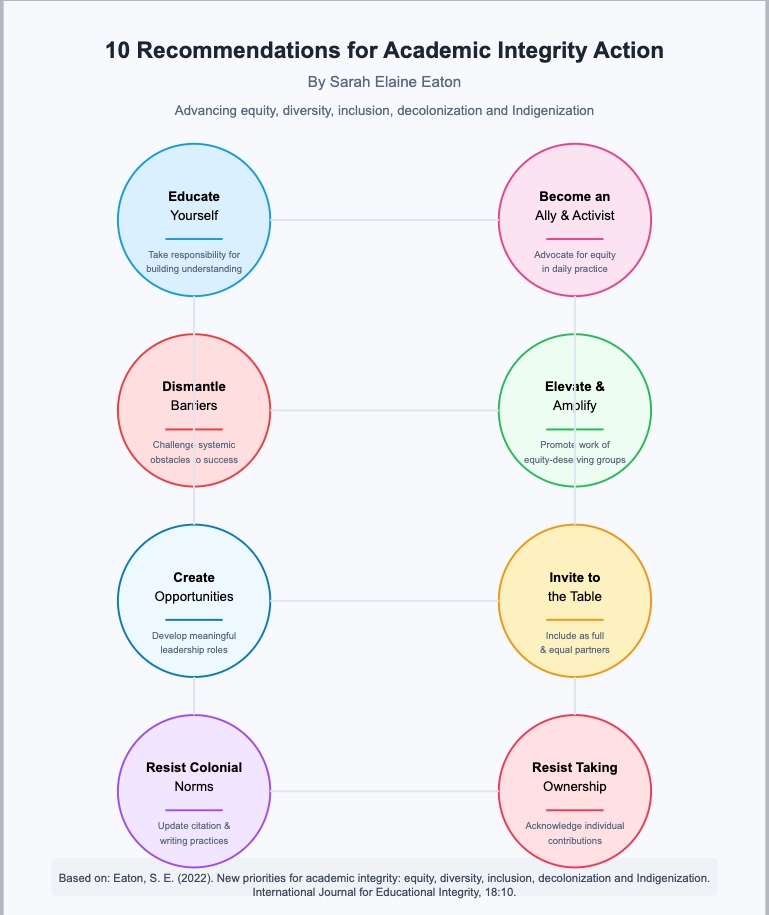
I worked with a GenAI LLM (Claude) to create an infographic based on this open access article that I wrote:

Eaton, S. E. (2022). New priorities for academic integrity: equity, diversity, inclusion, decolonization and Indigenization. International Journal for Educational Integrity, 1-12. https://doi.org/10.1007/s40979-022-00105-0 

Here’s the result:

An AI-generated infographic with 10 circles, each of a different colour, with black text inside each of them.
AI-Generated infographic summarizing key ideas in a research article.

I wanted to see how #AI could be used to help with knowledge mobilization and communicating complex research ideas in simple and visually appealing ways. I am not 100% happy with this, but I am also not entirely unhappy. I am curious to see how researchers and scholars can use AI to help make our research more digestible to the general public.

At the end of the experiment, I asked Claude: Based on our interaction just now, what would you say are the benefits and drawbacks of working with AI to create infographics to share findings of research articles?

Claude’s reply:

“I can identify several key benefits and drawbacks of using AI to create infographics for research articles:

Benefits:

  1. Rapid Prototyping and Ideation
  • Quick generation of multiple concept ideas (as shown when I suggested 4 different infographic approaches)
  • Fast iteration based on feedback (like when we added your name and citation)
  • Ability to quickly visualize complex concepts from text
  1. Structured Organization
  • Systematic breakdown of complex research findings into visual elements
  • Logical arrangement of information hierarchies
  • Consistent application of design principles
  1. Customization and Flexibility
  • Ability to modify designs based on specific requests
  • Easy incorporation of branding elements or author attribution
  • Adaptable to different formats and styles
  1. Technical Precision
  • Exact color codes and measurements
  • Consistent spacing and alignment
  • Precise vector graphics that maintain quality at any size

Drawbacks:

  1. Format and Output Limitations
  • Cannot directly generate common file formats like JPG or PowerPoint
  • Unable to provide downloadable files
  • Limited to specific output formats (in our case, SVG)
  1. Technical Barriers
  • Users need to know how to convert or adapt the outputs
  • May require additional tools or software to get desired final format
  • Some technical knowledge needed to implement suggestions
  1. Creative Constraints
  • Limited to certain types of visual representations
  • May not capture nuanced design choices that a human designer would make
  • Restricted by pre-programmed design patterns
  1. Implementation Challenges
  • Gap between AI suggestions and practical implementation
  • Need for manual conversion or recreation in other software
  • Extra steps required to get to final usable format
  1. Quality Control Requirements
  • Need for human oversight and verification
  • May require professional designer input for polishing
  • Could need additional refinement for professional publication

For optimal results, it seems the best approach would be to use AI as a rapid prototyping and ideation tool, then work with a professional designer or use appropriate software to create the final, polished version in the desired format. This combines the efficiency of AI for initial concept development with the precision and format flexibility of professional design tools.”

Note: The numbering issue is a function of formatting in WordPress. I’ll fix that later.

This was an interesting experiment. I’ll be interested to see how AI apps can help us better communicate our research and scholarship to members of the general public.

________________________

Share this post: 10 Recommendations for Academic Integrity Action: An AI-Assisted Experiment – https://drsaraheaton.com/2025/01/27/10-recommendations-for-academic-integrity-action-an-ai-assisted-experiment/

This blog has had over 3.7 million views thanks to readers like you. If you enjoyed this post, please ‘Like’ it using the button below or share it on social media. Thanks!

Sarah Elaine Eaton, PhD, is a Professor and Research Chair in the Werklund School of Education at the University of Calgary, Canada. Opinions are my own and do not represent those of my employer.


Postplagiarism in THE

January 15, 2025

How lovely to wake up this morning and see an article about postplagiarism in Times Higher Education. Karen Kenny from Exeter University writes about the six tenets and then extends the discussion to assessment.

It seems that the idea of postplagiarism is catching on. Dr. Rahul Kumar and I have launched a postplagiarism online community, where we share blogs, news, articles, and translations of the work into other languages. You can check out all our resources over on our other site.

________________________

Share this post: Postplagiarism in THE – https://drsaraheaton.com/2025/01/15/postplagiarism-in-the/

This blog has had over 3.7 million views thanks to readers like you. If you enjoyed this post, please ‘Like’ it using the button below or share it on social media. Thanks!

Sarah Elaine Eaton, PhD, is a Professor and Research Chair in the Werklund School of Education at the University of Calgary, Canada. Opinions are my own and do not represent those of my employer. 


The GenAI Gender Gap

January 10, 2025

There is a gender gap when it comes to GenAI.

Just 26.3% of the European Union’s artificial intelligence (AI) professionals are women, according to a report from LinkedIn.

In my work with of the Women for Ethical AI (W4EAI) UNESCO platform, we had similar findings in our gender outlook study.

An AI-generated image of a group of women.

There are no easy solutions to this gap, but for those working in this area, some five concrete things you can do to promote gender inclusion (and equity in general) are:

  • 
Invite women into leadership roles, strategic planing for artificial intelligence and advanced technology.
  • Ensure that policies explicitly include women, girls, and other equity-deserving groups.
  • Invite women (and in particular, early career women and those who are precariously employed) to share and showcase their expertise and knowledge (and compensate them for their contributions).
  • Create formal sponsorship programs for women and girls who want to develop their knowledge and cp-competencies related to AI, with ongoing opportunities for learning and skill development.
An AI-generated image of a group of women.

There are a myriad of ethical complexities when it comes to artificial intelligence and gender is only one of them. Acknowledging inequalities and then working to support equity, fairness, and justice will remain ongoing work in the years to come.

References

AI in the EU: 2024 Trends and Insights from LinkedIn. (2024). https://economicgraph.linkedin.com/content/dam/me/economicgraph/en-us/PDF/AI-in-the-EU-Report.pdf

United Nations Educational Scientific and Cultural Organization (UNESCO). (2024). UNESCO Women for Ethical AI: Outlook study on artificial intelligence and gender. https://unesdoc.unesco.org/ark:/48223/pf0000391719

________________________

Share this post: The GenAI Gender Gap – https://drsaraheaton.com/2025/01/10/the-genai-gender-gap/

This blog has had over 3.7 million views thanks to readers like you. If you enjoyed this post, please ‘Like’ it using the button below or share it on social media. Thanks!

Sarah Elaine Eaton, PhD, is a Professor and Research Chair in the Werklund School of Education at the University of Calgary, Canada. Opinions are my own and do not represent those of my employer.